
Collaboration
11 Brainstorming Tools to Improve Teamwork


Does your small business have remote workers? Or are you allowing your employees to work from home owing to the pandemic?
You are not alone. In fact, 57% of small business owners are considering allowing their employees to work from home post-pandemic.
While doing remote work is achievable and more productive, according to studies, you need to implement some effective brainstorming tools to facilitate creativity and improve teamwork.
But with so many tools out there, it can be difficult to settle for the right tool.
In this article, we will be focusing on 11 brainstorming tools to help you pick the right tool. Your team can use them to improve collaboration, facilitate innovation, and increase productivity.
1. Google Documents
Though popularly used for file sharing, Google Documents can serve as a simple yet useful brainstorming tool for your team.
Since it is shareable, you can create a new doc and share it with your team members, allowing them to edit.
Ideas can be built in real-time while motivating each other. As you can see who is typing what and leave comments, it is very practical. Plus, the Google Documents tool is free.
Have a look at Google Documents’ user interface:
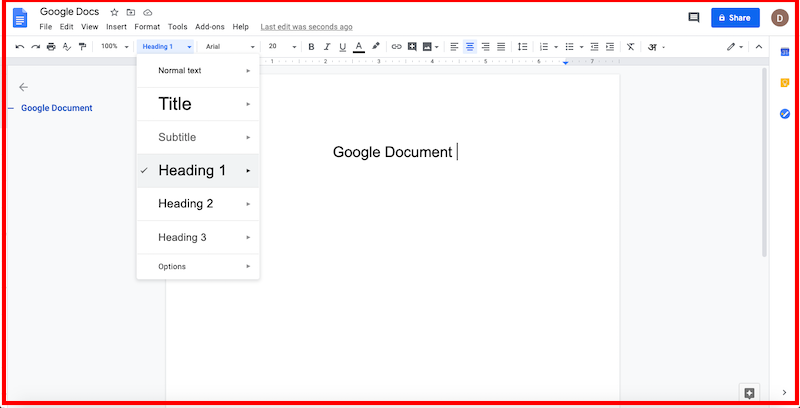
Key Features:
- Suggestion mode – When working on a shared document, Google Doc allows you to change the edit mode and it tracks changes. There is an Accept and Reject button for each comment.
- Voice typing – If you would rather use your voice than type, Google Docs have a voice typing feature. However, note that is presented only in the Chrome browser
- Tag feature – It also has a feature that allows you to tag a person when you want to draw their attention. They will get an email alert.
Platform: Compatible with Windows, macOS, Linux, Chrome OS, and also with mobile platforms. Google Docs apps are accessible for Android and iOS.
Pricing: Google Docs is free to use.
2. Bubbl.us
Using Bubbl.us will make it easier for your team to organize your ideas visually. It is designed to help you stay on task and capture your thoughts instantaneously.
Have a look at Bubbl.us’ user interface:
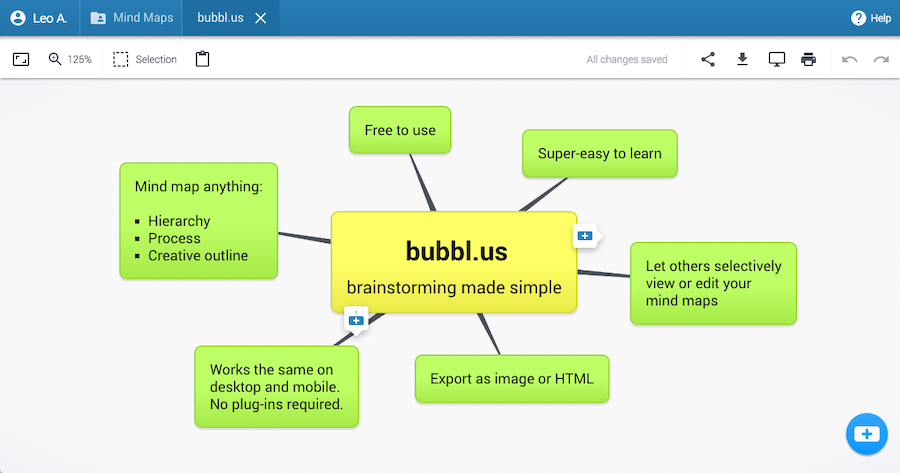
Apart from brainstorming new ideas, you can take notes, collaborate, and present more effectively.
To collaborate with your teammates, just add the contact/email id.
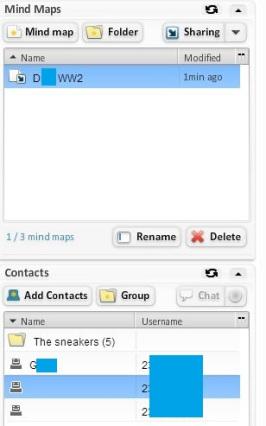
And click sharing. A menu will pop up.
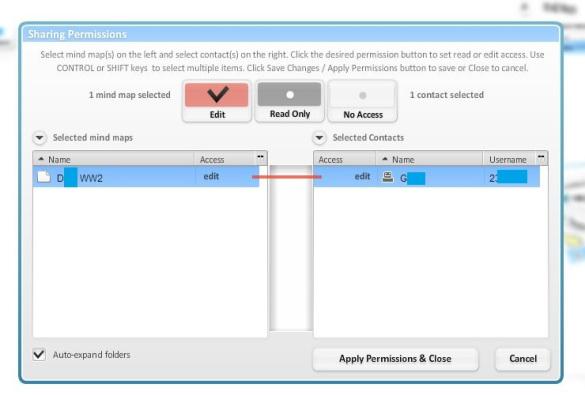
Click on the mind-map that you want to share and on the contact. You can allow the edit option to let other team members work on mind-map.
Key Features:
- Share and collaborate with others: The intuitive mind-mapping tool allows you to type ideas, plan and manage meetings, and share them with your team members.
- Intuitive interface: You won’t find any difficulty in navigating the tool as the intuitive interface and menus are laid down in a very simple way to meet your expectations.
- Print, save, and share diagrams: It allows you to print the diagrams in docs, save it in different formats such as PNG, HTML, JPG or PDF, and share your work via a link.
Platform: Browser-based – it works the same on mobile as well as on desktop.
Pricing: Bubbl.us offers a free trial and a premium plan at $6 per month.
3. Coggle
With the help of Coggle, you will be able to share complex information clearly. It allows you to share notes quickly and easily and map out processes, systems, and algorithms with the flowcharts, making it perfect for brainstorming.
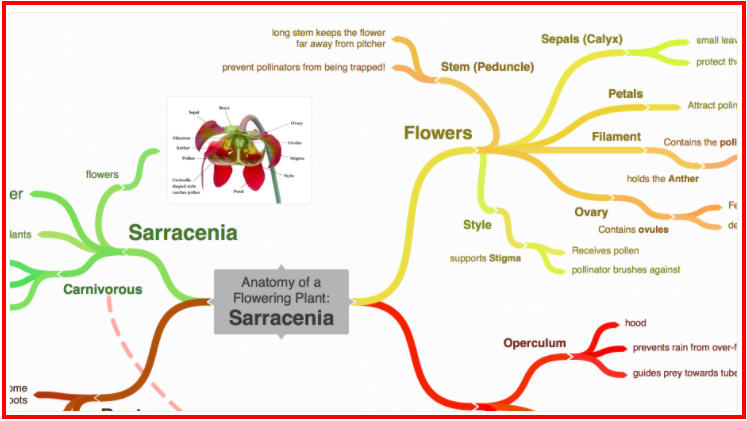
You can use it online in your browser. It doesn’t require any downloading or installing.
Key Features:
- Collaborative and interactive app: It supports real-time collaboration. You can invite other team members to work on diagrams all at the same time. You can also share a secret link with your team members where they can make edits without logging in.
- Mind-mapping and flow-charting made easy: You can upload unlimited images to the online diagram using its drag-and-drop feature. You can also join branches and design loops to represent process flows. Plus, it allows you to add floating text labels and images to explain parts of the map.
Platform: It works online in your browser and offers support for desktop, tablet, and mobile interfaces.
Pricing: Coggle offers three pricing plans:
- Freemium: $0 – it offers 3 private diagrams, including limitless public diagrams, core features, and shared folders.
- The Awesome plan: $5 per month – includes additional offers like unlimited private diagrams, high resolution image uploads, and collaboration via a link.
- The Organization plan: $8 per member per month – gives you all features you get in the Awesome plan. Additionally, you get features like bulk export, separate personal workspace, user and data management, and more.
4. WiseMapping
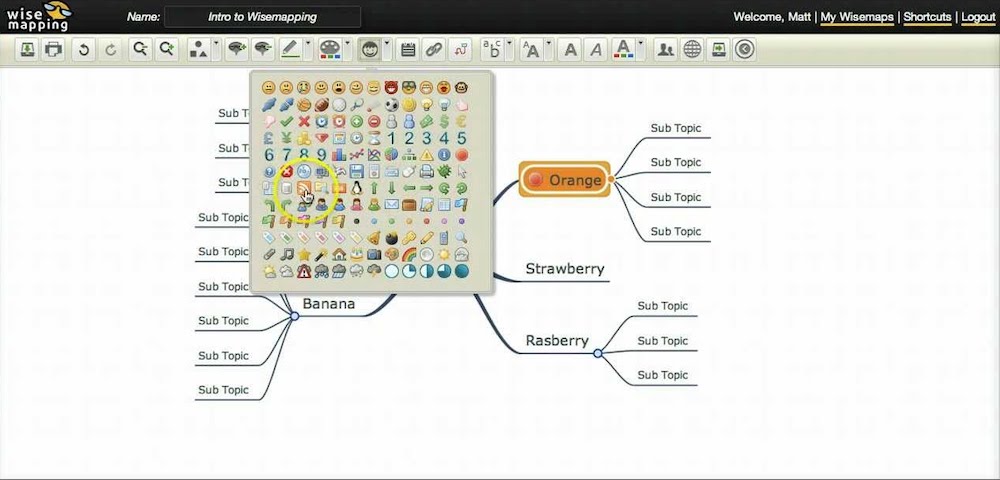
You can use this free java-based tool online or install it on your server to collaborate on mind maps. It has cool features, including customizable fonts and colors and icons.
When you are done building your mind maps, you can export it or embed it from WiseMapping on your blog. The tool integrates with LDAP to secure your data.
Here’s WiseMapping’s user interface:
Key Features:
- Complete mapping features: WiseMapping comes with varied tools that can create maps that reflect the users’ thoughts. The drag-and-drop interface is easy to use and you can freely move objects around and rearrange your diagrams on the platform.
- Public and personal workspaces: WiseMapping allows a private mind mapping environment for personal ideas. But you can also use the public mapping feature and invite other team members.
- Flexible: Though WiseMapping is originally designed for the web, you can also install it on the organizations’ servers and distribute them within their system securely.
Platform: Compatible with all modern browsers, including Microsoft Internet Explorer 8 and above, Firefox 12 and above, Google Chrome 19 and above, Safari 5 and above, and Opera 11 and above.
Pricing: WiseMapping is a free tool.
5. LucidChart
A visual workspace that enables diagramming, collaboration, and data visualization, using LucidChart will accelerate understanding and boost innovation.
It is an intuitive, cloud-based solution that allows you to collaborate in real-time and allows you to create whiteboard, brainstorm, or build flowcharts, UML diagrams, and mockups, among others.
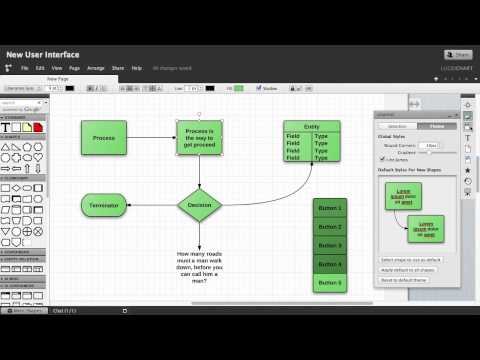
Here’s what LucidChart’s user interface looks like:
Key Features:
- Easily style shapes: LucidChart makes it super easy to style shapes as it gives you the option to choose the font, size, color, and line style before you drag any shapes on the canvas. After that, the styling you choose will be automatically applied to the shapes you drag and drop on the canvas.
- Expandable canvas: With Lucidchart’s one-click solution, you can expand the canvas and make big diagrams when required.
- Keep diagrams organized with containers: You can keep your diagrams organized and easy to read by using containers or swimlanes features.
- Collaborate and get feedback: Once you create your diagram, you can collaborate without leaving the platform. There is a commenting feature where your team can leave comments on specific shapes or the document as a whole.
Platform: Lucidchart is compatible with Mac, PC, Linux, iOS, and Android operating systems.
Pricing: Lucidchart offers four pricing plans:
- Freemium: It’s a free plan.
- The Individual Plan: Starts at $7.95. With this plan, you get unlimited editable documents, 1000+ professional templates, and more.
- The Team Plan: Starts at $6.67 per user. It can be used by 3 users minimum and you will get to enjoy advanced collaboration and integration features.
- The Enterprise Plan: Quote-based plan.
6. Milanote
If your business needs to create high-quality documents fast with ease while collaborating with multiple contributors, this tool is for you. It is a great organizing tool where you can bring your best ideas and see them grow.
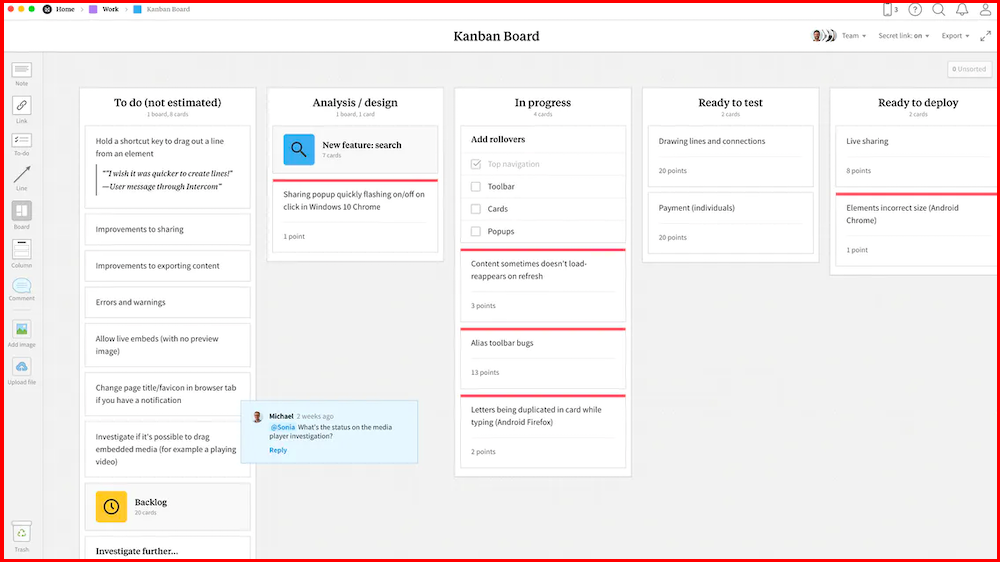
Many use this tool for group brainstorming as it allows you to see what other team members are working on and make comments.
Its drag-and-drop interface will allow you to arrange images, notes, links, files, videos, and tasks on a virtual canvas. Plus, all the content you place in Milanote will be synced to the cloud.
Key Features:
- Easy to use drag and drop interface – With Milanote’s drag and drop interface you can easily arrange things in a way that best suits your project.
- Shared workspace – You can either use Milanote’s boards to think privately or use it as a shared workspace for collaboration.
- Edit in real-time – You will be able to see the changes your team makes and leave comments. It also offers smart notifications and alerts so you won’t miss a thing.
- Share the result – When everything is done, you can invite your team members to view and edit your boards. You can also download a high-quality printable PDF.
Platform: It is compatible with iPhone, Mac, Windows, and Chrome and Safari browsers.
Pricing: Milanote offers two plans:
- Freemium Plan: A free pricing plan which offers features like sharing unlimited boards, adding 100 notes, images or links, and uploading 10 files.
- The Professional Plan: Priced at $9.99 per month per person billed annually and $12.50 when billed monthly. You will get everything on the free plan, unlimited notes, images, and links, upload unlimited files, and search board and content.
7. Miro
Miro features a versatile virtual whiteboard with which you can conduct remote brainstorming. You will get a lot of pre-built templates and sticky notes.
Here’s Miro’s user interface:
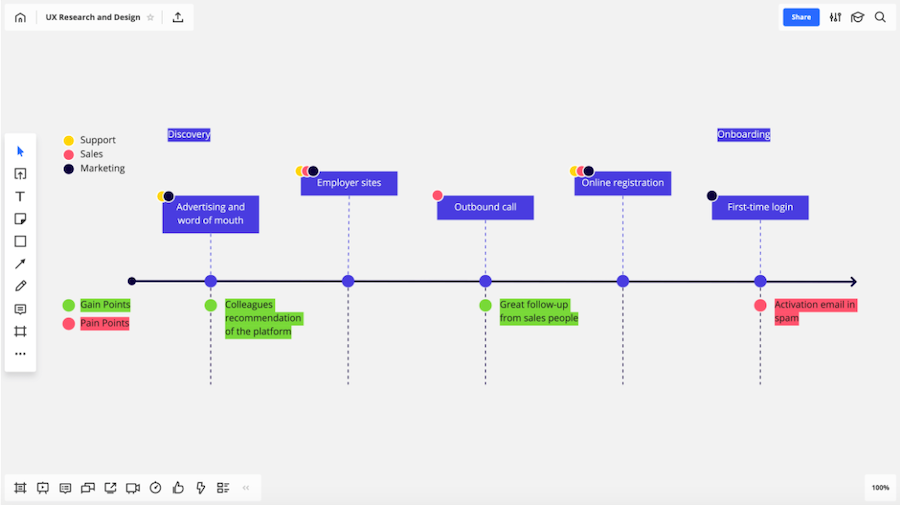
You will be able to easily import images, PDF, keynotes, PowerPoint files, and more. After you are done, you can export the board and share it with your team.
The tool can be integrated with Slack and other instant messaging apps.
Key Features:
- Zoomable canvas and whiteboard: With Miro’s infinitely zoomable canvas and web whiteboard, you can unleash your creativity, plan projects from different angles, and create centralized hubs of information keeping everyone in the loop.
- Extensive Integration: The tool can be integrated with Slack, Dropbox, Box, Google Suite, and other instant messaging apps.
Platform: It is compatible with PCs and laptops, iPad, Windows, or Android Tablet.
Pricing: Miro offers four pricing plans:
- Free: With Miro’s free plan, you can avail features including 3 editable boards, premade templates, and core integrations.
- The Team Plan: $8 per month. It provides features like unlimited boards, unlimited external board viewers and commenters, and advanced attention management.
- The Business Plan: $16 per month. It comes with features like Single Sign-On (SSO), day passes for occasional collaborators, external editors, and more.
- The Enterprise Plan: Custom plan.
8. Mural
A digital workspace for visual collaboration, Mural can help you to think and collaborate visually while solving important problems. You can create diagrams fast and with ease, and there are tools to facilitate meetings and workshops.
Have a look at Mural’s user interface:
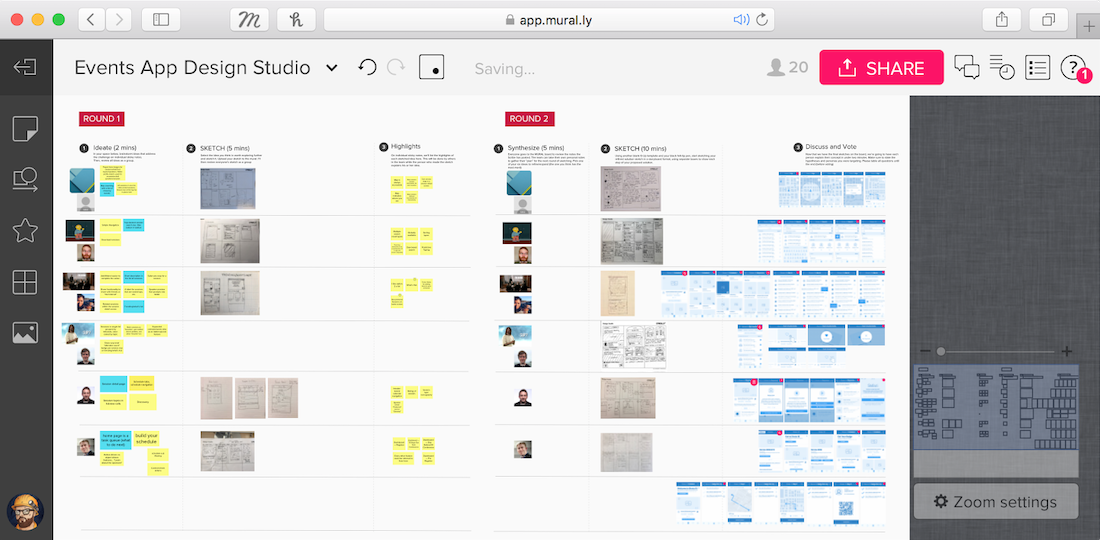
Moreover, its sticky notes feature will allow you to organize lists, flowcharts, diagrams, frameworks, methods, and drawings.
Key Features:
- Collaborate visually – Mural helps your team to think and collaborate visually to solve problems.
- Enjoy speed and ease of use – You can benefit from Mural’s speed and ease of use while creating diagrams.
- Thinking canvas – You can put your thoughts on sticky notes and organize in lists, flowcharts, diagrams, frameworks, methods, and drawings.
- Visual teamwork – Have impactful meetings and workshops. Enjoy shared workspaces, remote facilitation features, conduct expert coaching and education, and more.
Platform: It supports browsers including Chrome, Edge, Firefox and Safari. The apps support Windows10, iOS, and the Microsoft Surface Hub.
Pricing: Mural offers three pricing plans:
- The Starter Plan: $12 per membership/month. It will give you access to collaboration in a single workspace, unlimited visitors, library of frameworks and templates, and more.
- The Plus Plan: $20 per membership/month. It offers features like unlimited guests, SAML or oAuth2 single-sign-on, priority support, and more.
- The Enterprise Network Plan: It offers customized pricing.
9. Whatfix
Considered the biggest WalkMe alternatives out there, Whatfix is a training tool that any business can use with ease. It allows you to adjust to your users’ onboarding needs.
Its real-time, in-app help is customized to individual roles. And the tool adds context and relevance to a learner’s experience, making the training more effective.
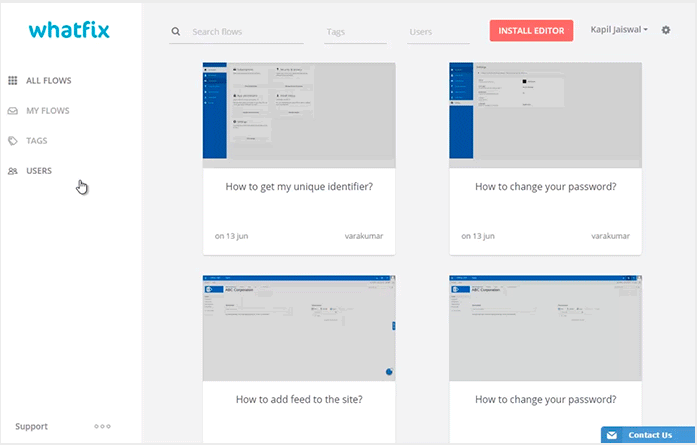
What’s more? You can hold brainstorming sessions with managers and get valuable insights from them.
Key Features:
- Offer a superior user experience – You can adjust to your users’ onboarding needs and offer personalized journeys.
- Real-time in-app help – Use Whatfix’s real-time in-app help that is customized to individual roles.
- Offer on-the-job learning – Your training will be more effective when you add context and relevance to a learner’s experience offered by Whatfix.
Platform: It supports mobile devices and browsers, including Firefox, Chrome, Internet Explorer, Edge, Safari, and Opera.
Pricing: You can request a custom pricing quote.
10. Otter.ai
You can use this AI-powered tool Otter for brainstorming, generating notes for meetings, interviews, or voice conversations.
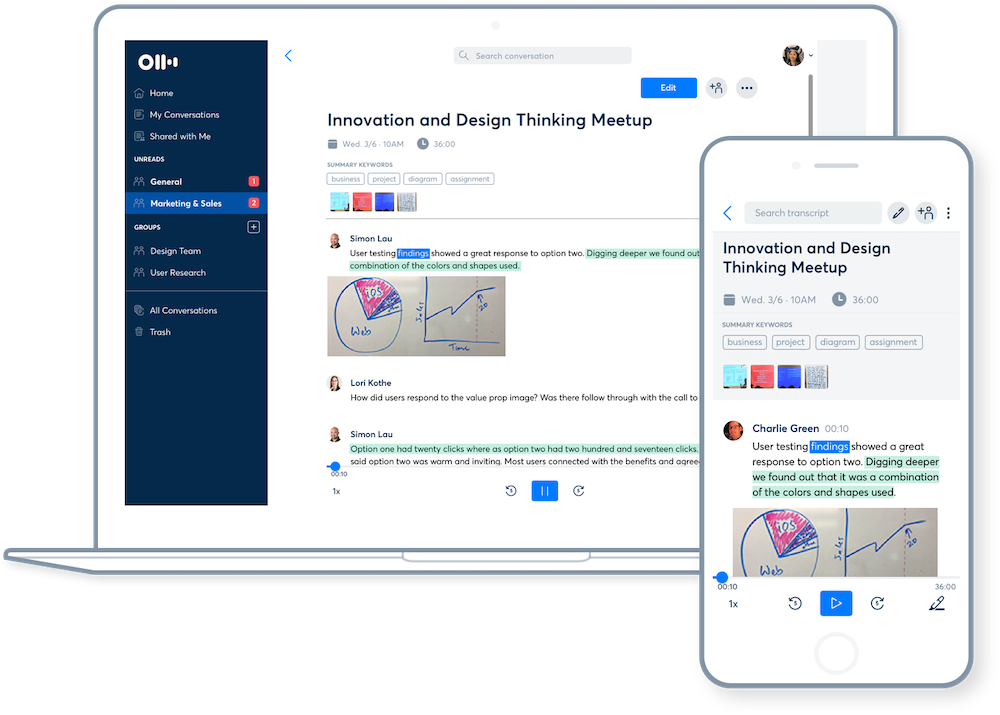
Their new release, Otter 2.0, comes with more functionality to increase collaboration and productivity. The Teams plan has features designed especially for SMBs and teams in larger enterprises.
Key Features:
- Create rich notes – You can create rich notes for meetings, interviews, lectures, and other voice conversations.
- Make fast, accurate transcriptions – You can make fast, accurate transcriptions with Otetr.ai. It also offers speaker identification and streamlined management tools.
- Enjoy more functionality with Otter 2.0 – The new Otter 2.0 will give you improved collaboration and productivity.
Platform: It supports Google Chrome (version 67 or higher), Safari (version 11 or higher), Firefox (version 59 or higher), and Edge (version v80 or higher). The mobile app supports iOS and Android. Plus, it works with Zoom meetings.
Pricing: Otter offers three pricing plans:
- The Basic Free Plan: $0. It offers many core features including record and playback, transcribe in real-time, search by keywords, and more.
- The Premium Plan: $8.33 per month. It offers all the premium features like import audio and video, advanced export, custom vocabulary, and more.
- The Teams Plan: $20 per month. It offers advanced features like Otter live notes for Zoom, team vocabulary, time codes, centralized billing, and more.
11. Canva Online Whiteboard
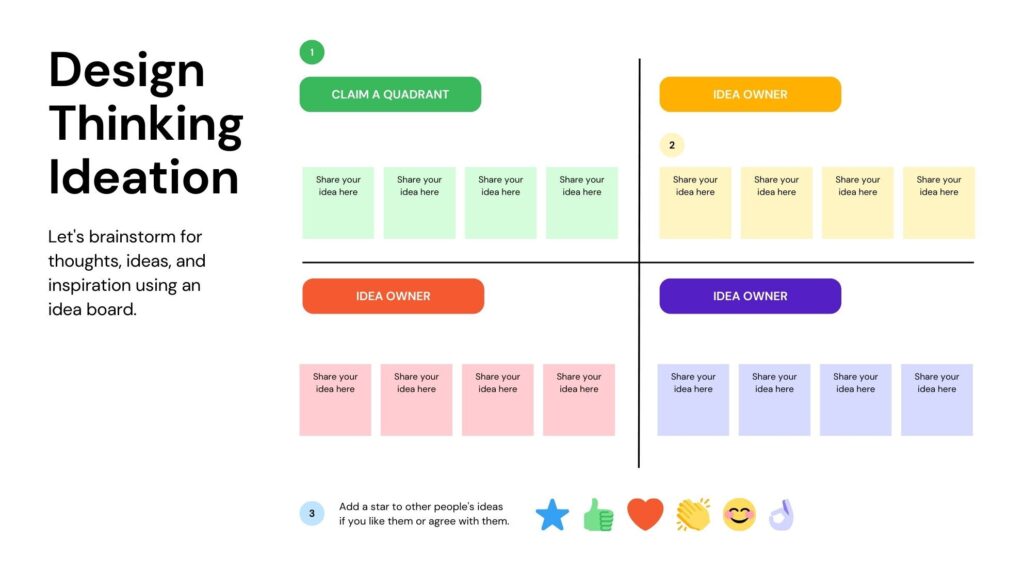
People are discovering new ways to work together online and accomplish goals as remote work quickly spreads throughout society. When you and your team are bringing your ideas to life, Canva’s Online Whiteboard makes it enjoyable and simple to workshop, brainstorm, collaborate on an endless canvas, and see each other’s contributions as they happen.
Have a look at Canva Online Whiteboards’ user interface:
Key Features:
- Unlimited space for unlimited ideas: infinite canvas on Canva Whiteboards, you have all the room you need to unleash your best ideas.
- Collaborate with ease: Invite the entire team to work on your design and easily collaborate in real time
- Customizable charts and tables: Data visualization made easy. Easy flowcharts with features like Quick Flow, Connecting Lines, and Shapes
- Extensive library: Hundreds of templates with popular use cases
Platform: It works online in your browser, and Canva App, and offers support for desktop, tablet, and mobile interfaces.
Pricing: Free
Wrapping Up
There you have it, 11 brainstorming tools that you can start using right away to improve teamwork. Brainstorming and collaborating is crucial as it boosts your critical thinking and problem-solving skills as a team.
However, in order to do that while working remotely, you need essential tools that can allow sharing your innovative ideas with ease. To get the most out of your sessions, keep these points in mind:
- Ensure that the tools you choose are easy to navigate and can record ideas while you share them.
- Good brainstorming tools also allow users to vote or comment on ideas, helping to prioritize and organize effectively.
- Start your session with a clear goal or question to keep everyone focused.
- Use built-in templates in your chosen tool to add structure and save time.
- Capture everything — use tools like Otter.ai for transcription or Google Docs for note-taking alongside visual aids like sticky notes or diagrams.
- Encourage free idea flow with visuals, sketches, or voice notes, depending on your tool.
- Group and prioritize ideas using color coding, clustering, or voting features that many tools offer.
- Wrap up by summarizing key takeaways, assigning next steps, and sharing outcomes directly from your brainstorming board or document.
- Save your setup as a reusable template to streamline future sessions.
The tools mentioned in this article are some of the best tools that you can implement to boost your creativity and be more productive. Start using them today to see positive results.

Imagine your boss put a salesperson forward for promotion. It can all be motivating until you find out that this salesperson doesn’t have the best performance record compared to other candidates.
Turns out… they spend a lot of time with the boss outside of work.
Today, it might sound like an isolated case, but it’s not. Favoritism at work is more common than most people think. You can work hard and always give your best, yet still go unrecognized just because you’re not a favorite. In fact, a survey by SideHustles.com found that 9 in 10 employees have witnessed favoritism at work, and 1 in 4 say it happens all the time.
Understanding workplace favoritism is key, whether you’re in HR, a leader, or just part of the team. This awkward and unfair situation can tank morale and productivity since employees might feel their hard work doesn’t matter.
Fortunately, the problem can be fixed with the right education. Once you can identify it, you can take the necessary action to ensure better practices are followed in the future.
What is favoritism at work?
One of the obvious signs of favoritism at work is when the boss plays favorites, giving extra perks, promotions, or attention to certain employees not because of their stellar performance but because of personal biases or relationships.
It’s like the workplace version of being the teacher’s pet, except way less cute and way more unfair. Just imagine doing all the heavy lifting while someone else gets the gold star just for hanging out with the boss after hours.
Favoritism at work might not be just a minor annoyance because it can seriously mess with workplace morale and culture. When employees see that hard work and talent aren’t the keys to success, it can lead to frustration and disengagement. Why bother putting in the effort if the rewards go to the boss’s buddy anyway?
t’s not just a matter of frustration – favoritism has real, measurable consequences. A study published in Sustainability found that favoritism acts as a significant workplace stressor, harming employees’ perception of the organization. Over time, this can lower morale, reduce motivation, and even undermine efforts to build a sustainable, high-performing workforce
Signs your boss plays favorites
Sometimes favoritism hides in plain sight. You might sense that something is off – certain people seem to have it easier, while others keep hitting invisible walls. Here are a few signs your boss might be playing favorites:
- The same people always get the spotlight. Whether it’s important meetings, new projects, or public praise, one small circle seems to get all the chances.
- Rules bend for a few. Deadlines, performance expectations, or company policies suddenly become flexible when a favorite is involved.
- Private conversations happen often. You notice frequent closed-door meetings or personal chats that others aren’t part of.
- Feedback and recognition aren’t consistent. Some employees get regular encouragement and coaching, while others are left guessing.
- Social favoritism leaks into work. Hanging out after hours or personal friendships seem to influence professional decisions.
- Team morale drops. You start hearing more quiet frustration or see colleagues pulling back from collaboration.
Spotting these signs early can help you decide how to respond – whether that means addressing the issue directly or protecting your own growth and motivation.
How can employees deal with favoritism at work?
So, you’ve spotted favoritism in the office. Now what?
Dealing with favoritism at work can be tricky, but here are some steps to help you navigate this awkward terrain and keep your sanity intact.
Stay professional
First things first, keep your cool. It’s easy to get frustrated or angry, but maintaining professionalism will serve you better in the long run. When someone in the office plays favorites, take a deep breath and focus on handling the situation calmly and rationally.
It’s tempting to vent your frustrations to coworkers, but office gossip can backfire. Not only does it contribute to a toxic work environment, but it can also damage your reputation. Keep conversations about favoritism constructive and focused on finding solutions.
Continue to perform your job duties to the best of your ability. Show up on time, meet deadlines, and participate in team activities. Concentrate on your tasks and performance while it’s easier said than done. Let your professionalism and work ethic shine through, even if it feels like your efforts aren’t being recognized. Stay updated with YouTube trends to find new ways to stay motivated and inspired in your work.
Always stick to the facts. Avoid letting emotions color your observations. For example, instead of saying, “My boss hates me,” say, “On three occasions, my boss assigned high-profile projects to less experienced colleagues.”
Document everything
Whenever you observe an instance of favoritism, note the exact date and time. This helps establish a timeline and shows that favoritism is not a one-time event but a recurring issue.
Look for patterns in the favoritism. Does it happen with certain types of tasks, projects, or in specific situations? Documenting these patterns can help you identify and demonstrate systemic issues rather than isolated incidents.
Write down exactly what happened in each instance. Be specific about the actions or decisions that indicate favoritism. For example, “On July 5th, during the team meeting, the boss assigned the lead role on the new project to John, despite my prior experience and expressed interest.”
You can also include instances where you have gone above and beyond in your role to show your commitment and contrast with the favoritism you’re experiencing.
This clear, factual evidence can support your case when discussing the issue with your boss, HR, or higher management. It is more likely that your concerns will be taken seriously and addressed appropriately.
Communicate
If the issue persists and directly talking to your boss isn’t an option, take your concerns to HR. Frame your concerns using “I” statements to express how favoritism affects you personally without sounding accusatory. This helps to keep the conversation constructive.
For example, rather than saying, “You never recognize my work and always favor John,” say, “I feel overlooked when my contributions aren’t acknowledged, and it impacts my motivation.”
Explain how the favoritism is affecting your work and the overall team morale. Highlight the broader implications, such as decreased productivity or lowered team spirit, to emphasize the importance of addressing the issue.
Don’t forget to always provide specific examples of favoritism rather than making general statements. Refer to your documentation to cite specific incidents, dates, and actions.
Or, you can ask for regular feedback on your performance. This shows your commitment to improvement and also provides a benchmark for your achievements. If possible, request feedback in a written form to create a paper trail of your progress.
Consider your options
If favoritism is deeply ingrained and impacts your career growth, it might be worth considering other opportunities within or outside the company.
If you’ve tried everything you can to deal with it but always come up short, the best move for your career is to find a place where your talents are recognized and appreciated.
To prevent this from happening again, make sure that before applying for a new job, you thoroughly research the company culture and values. Seek out reviews from current and former employees, look for any red flags in how they handle promotions and recognition, and consider asking about their policies on performance evaluation during your interview.
on your performance. This shows your commitment to improvement and also provides a benchmark for your achievements. If possible, request feedback in a written form to create a paper trail of your progress.
What can HR do with favoritism at work?
It’s HR’s job to make sure that fairness and equity are prioritized in the workplace. To tackle favoritism issues effectively, HR professionals should have policies and practices that promote transparency, meritocracy, and equal opportunities for all employees. Here are some best practices that HR can use to deal with favoritism at work.
Transparent and fair promotion criteria
When promotion criteria are transparent, they are communicated to all employees– so it leaves no room for ambiguity or misunderstanding. If needed, you can create explainer videos to clarify the promotion criteria further so that everyone understands the expectations and processes involved.
This makes sure that every team member understands the expectations and benchmarks they need to meet in order to advance in their career.
Fair promotion criteria are based on objective measures of performance, skills, and qualifications relevant to the role. This means that promotions are awarded based on merit and demonstrated capability rather than subjective factors like personal relationships or favoritism.
When both transparency and fairness are upheld in promotion criteria, employees feel motivated to strive for excellence knowing that their efforts will be fairly recognized and rewarded.
Promote team-building initiatives
Effective team-building initiatives can be activities like team outings, workshops, knowledge sharing, retreats, and collaborative projects. These activities provide opportunities for employees to interact in a relaxed and informal setting, away from the pressures of daily tasks.
When employees participate in team-building exercises, they can learn to appreciate each other’s strengths, build trust, and develop effective teamwork skills.
Not only that, team-building initiatives can help break down barriers between different departments or hierarchical levels within the organization. It would be much easier for employees from diverse backgrounds to collaborate on tasks or solve challenges together. This, in return, will promote cross-functional understanding and alignment towards common goals.
Use workplace surveys
Surveys allow HR to monitor the prevalence of favoritism indirectly. Questions about team dynamics, perceived fairness in decision-making, and trust in leadership can indicate whether favoritism may affect morale or perceptions within the workforce. Patterns or trends in survey responses can highlight areas where further investigation or intervention may be necessary.
Not to mention that workplace surveys also encourage transparency and open professional communication. When employees feel their opinions are valued and confidentially collected through surveys, they are more likely to provide honest feedback.
Allow employees to report favoritism anonymously
Anonymity removes barriers that might prevent employees from speaking up about instances of favoritism.
Knowing that favoritism can be reported anonymously fosters accountability among managers and leaders. It allows them to share their concerns freely without fear of retaliation or bias. All of this will promote a more open and honest workplace culture.
To effectively implement anonymous reporting of favoritism, HR should establish clear guidelines and procedures for employees to submit reports confidentially. This includes providing multiple reporting channels such as anonymous online forms, dedicated hotlines, or third-party platforms.
Key takeaways on favoritism at work
Favoritism can quietly damage even the healthiest workplace culture. When it’s left unaddressed, it chips away at trust, motivation, and teamwork. But it can be prevented when everyone – employees, leaders, and HR – takes responsibility for fairness.
Here are a few reminders to keep your workplace balanced:
- Be aware and stay factual. Recognizing favoritism early makes it easier to address calmly.
- Keep your integrity. Continue doing your best work and avoid gossip or emotional reactions.
- Communicate the right way. Use clear, respectful language when bringing up concerns.
- Leaders must stay transparent. Decisions about projects, pay, or promotions should be based on clear performance metrics.
- HR should create safe feedback channels. Anonymous surveys, open discussions, and fair evaluation systems make favoritism less likely to thrive.
Fairness builds strong teams – and strong teams build great results.

Nowadays, virtual spaces are the primary medium for interaction – so the importance of collaborative work cannot be overstated.
The statistics say, the shift to remote work poses unique challenges for HR managers. Adapting to the digital era requires more than just embracing technology, it demands innovative strategies to ensure teams stay connected, aligned, and engaged.
In this article, we’ll explore 9 steps managers can follow to enhance collaborative work in remote teams. From implementing real-time collaboration platforms to supporting mental well-being, these strategies can serve as a roadmap for creating a virtual work environment that promotes trust, unity, and success.
Let’s delve into the details and find out how these strategies can transform collaborative work from a challenge to an opportunity.
Step 1: Implement real-time platforms for collaborative work
Real-time collaboration platforms enable instant conversations, build camaraderie, and connect remote teams. Consider popular platforms like Chanty, Slack, or Zoom for:
- fostering team unity, mirroring informal exchanges found in a physical office
- promoting fast problem-solving as team members can quickly reach out for help, bypassing email delays
- improving information flow by allowing instant file and resource sharing.
To make the most of collaboration platforms, create dedicated channels for specific teams and projects to work collaboratively, ensure targeted information sharing, and avoid information overload.
Use emojis to convey tone and provide context in virtual communication, where tone and facial expressions might be lost. But, don’t neglect the importance of face-to-face interactions – hold regular video conferences and virtual team-building activities to maintain personal connections without a hint of favoritism at work. Whether it’s a virtual trivia night, a remote escape room, or a simple virtual coffee break, these activities are the key to keeping your team connected and engaged.
Step 2: Encourage regular virtual meetings
Virtual meetings offer you the perfect space for idea sharing and discussion, ensuring alignment on goals and providing a direct communication channel – just like in-person interactions in a physical office setting.
For engaging meetings and team bonding, consider these:
- Kick off with icebreakers: Begin meetings with so-called icebreakers or team-building exercises to relax attendees and foster camaraderie.
- Incorporate polls: Use polls to quickly gauge team opinions and encourage engagement.
- Use breakout rooms: Breakout rooms are perfect for smaller group discussions, allowing for more intimate conversations and ensuring everyone has a chance to voice their thoughts.
For successful virtual meetings, it’s crucial n ahead. Begin by setting clear agendas – share discussion topics beforehand to help participants prepare and create more structured, productive sessions. Next, assign roles: designate a facilitator to guide the conversation, a timekeeper for punctuality, and a note-taker to record outcomes.
Lastly, prioritize time management. Keep your meetings concise, stick to the agenda, and avoid going off on tangents. This respects the attendees’ time and ensures a focused and productive discussion.
Step 3: Promote active participation in the collaborative work
Active participation is a key element in creating a sense of inclusion within your team. When every team member feels heard and valued, it fosters trust and encourages the open sharing of ideas and input. This not only supports collaboration but also enhances discussions and contributions to problem-solving and decision-making.
Here’s how you can encourage active participation in your team:
- Adopt a “round-robin” approach: Implement a system where each team member gets a chance to share their thoughts or updates. This way everyone has an opportunity to contribute and you prevent just one or two voices dominating the conversation.
- Assign roles to team members: Give each person specific responsibilities during meetings or discussions, like facilitator, timekeeper, or note-taker. This not only keeps the meeting organized but also involves multiple team members in the process, encouraging active participation.
- Ask open-ended questions: Inspire team members to share their perspectives and elaborate on their thoughts with open-ended questions. You’ll avoid just a yes or no answer, which can lead to deeper insights and more meaningful discussions.
The benefits of active participation are numerous. When team members feel included and valued, it boosts morale and fosters a positive work environment, increasing motivation. This sense of inclusion also enhances engagement, making team members more invested in their work.
By promoting openness and active participation in work processes, you’re building a culture of inclusion, collaboration, and mutual respect. In the long run, you’ll have a more engaged, motivated, and productive team.
Step 4: Establish clear guidelines for collaborative work
In a remote work setting, clear guidelines for collaborative work are your crucial roadmap to navigate the challenges of the virtual workspace. They’re not just rules, they’re your way of defining expectations for information sharing, and collaboration.
Here’s how you can implement effective collaborative work guidelines:
- Set response times for different communication channels, such as responding to emails within 24 hours and Slack messages within two hours.
- Specify the appropriate communication channels for various purposes — for example, using Slack for team updates and casual conversations, email for formal communications, and video calls for in-depth discussions or team meetings.
- Check different communication models and try to apply the most appropriate one
- Encourage team members to use a consistent, professional, courteous, and respectful tone in their communications and provide examples to clarify expectations.
- Define file-sharing protocols, including using secure platforms like Dropbox or Google Drive, and offer guidance on file naming conventions and version control.
- Outline best practices for data security, such as not sharing sensitive information via email, using secure Wi-Fi networks, and employing strong, unique passwords.
- Promote a transactional model of communication.
- Provide tips for managing message overload, like using specific channels for different topics, muting non-essential notifications, and setting “Do Not Disturb” periods for focused work.
As a result, your team will enjoy smoother collaborative work, better organization, and a more successful remote work culture.
Step 5: Recognize and celebrate achievements
Recognizing and celebrating achievements is more than just a nice gesture; it’s a powerful way to strengthen collaborative work in your remote teams.
When you acknowledge accomplishments, you’re doing more than just saying “Good job”. You’re boosting team morale and making members feel valued and appreciated for their contributions. This recognition promotes a sense of pride, spurring individuals to continue working collaboratively towards shared goals.
Moreover, celebrating successes in team meetings or workplace chats stimulates conversation and interaction among team members, enhancing collaborative work and creating a more connected team environment.
Here are some recognition strategies you can try:
- Virtual awards: Host virtual award ceremonies to recognize achievements with virtual awards or certificates, whether monthly, quarterly, or yearly.
- Team shout-outs: During team meetings or group chats, give shout-outs to team members who have made significant contributions.
- Sharing success stories: Share success stories in team channels to showcase achievements and highlight their impact on the organization.
Remember, it’s crucial to acknowledge both individual and team achievements. Recognizing individual contributions highlights unique skills and efforts, while celebrating collective efforts reinforces the significance of collaboration and teamwork.
Step 6: Facilitate collaborative work skills
Encouraging your team members to refine their skills is more than just a way to improve their performance – it’s a way to empower them to be more effective contributors and enhance collaboration within your remote team.
Developing skills is essential for your remote teams, and here’s why:
- Better collaboration: When team members learn new skills, they’re more equipped to work collaboratively, share insights, and contribute to the team’s overall success.
- Improved communication: Enhancing communication skills enables your team members to express their ideas more clearly, listen more effectively, and engage in more productive conversations.
- Stronger teamwork: Skill development empowers your team members to work collaboratively and adapt to changing dynamics with ease.
Provide your team with access to resources that offer a wide variety of courses on topics such as leadership, collaborative work, and project management. It allows team members to learn at their own pace and apply new skills directly to their work.
Coursera is another great resource, offering courses from top universities and organizations on topics like collaborative work and teamwork. These courses provide valuable insights from industry experts and can be an excellent resource for your team.
Additionally, encourage team members to lead training sessions on relevant topics to promote knowledge sharing and enhance collaboration. This not only helps team members learn from each other but also fosters a culture of continuous learning.
Step 7: Promote virtual collaboration tools
Collaboration tools are essential for enabling teamwork – they provide a shared platform for project management, task tracking, and document sharing, allowing your team members to work collaboratively, even from different locations.
Moreover, these tools come with built-in messaging and communication features that facilitate communication, real-time updates, and project discussions among team members. When everyone can see shared goals, track progress, and contribute to team success, team cohesiveness is improved.
Consider using organizational tools such as Chanty for collaborative work and task management, Asana for project management, and Google Workspace for a comprehensive suite of real-time document collaboration tools like Google Docs, Sheets, and Slides. These platforms can greatly improve teamwork and efficiency in remote settings.
To maximize the benefits of collaboration tools, follow these best practices:
- Set clear task ownership: Assign tasks to specific team members, ensuring everyone knows their responsibilities and can be held accountable for their contributions.
- Maintain updated documentation: Keep all documentation, such as project plans, task lists, and meeting notes, current in your collaboration tools, providing everyone with the latest information for informed decision-making.
- Integrate tools for seamless workflows: Incorporate collaboration tools with other essential team tools, such as communication platforms or file-sharing services. This integration creates a smooth workflow and allows for easy access to information from multiple sources.
By doing so, you’re not merely simplifying teamwork. Instead, you’re cultivating a culture of collaboration and teamwork that will be a key driver of your team’s success.
Step 8: Seek feedback on collaboration processes
Creating a feedback loop for communication processes is more than just good practice – it’s your key to continuous improvement, refining collaborative work, and building team trust.
There are several methods you can use to collect feedback, but combining them gives you a comprehensive understanding of your team’s communication needs and preferences:
- Anonymous surveys: These provide a safe space for honest feedback. Your team members can share their thoughts without fear of judgment, giving you valuable insights into areas that need improvement.
- Open forums: Encourage transparent dialogues and team interaction by holding open forums. This not only gives you feedback but also creates a sense of ownership and involvement among your team members.
- Individual check-ins: These offer deeper insights into unique perspectives and allow for more personalized sharing. By checking in with each team member individually, you show that you value their input and are committed to understanding their needs.
However, gathering feedback is just the beginning. The magic happens when you take action and make meaningful changes. Recognize and acknowledge the input from team members, and involve them in the decision-making process for implementing changes. This validates their input and increases their investment in the success of the new strategies.
Regularly follow up to evaluate the effectiveness of the changes and make ongoing adjustments based on further feedback. This creates a dynamic and responsive communication strategy that adapts to your team’s evolving needs.
Step 9: Support mental well-being
Mental well-being is key to fostering open collaborative work and teamwork. As an HR professional or business leader, you must understand that supporting mental well-being is crucial in creating a positive and productive work culture in a remote setting.
Here are some ways you can support your team’s mental well-being and avoid exhaustion:
- Introduce virtual yoga sessions: Incorporate virtual yoga sessions into the workweek, and give your team members a chance to unwind, focus, and recharge. This simple yet impactful practice can help them manage stress and enhance their mental well-being.
- Offer mental health workshops: Arm your team members with coping strategies, stress management tools, and resilience-building techniques by hosting mental health workshops. This not only aids them in managing their mental well-being but also cultivates a culture of support and understanding within the team.
- Counseling services: Give access to counseling services and create a confidential space for your team members to discuss their concerns, seek professional support, and navigate challenges. This demonstrates that you value their overall well-being.
- Encourage open conversations: Break down barriers and diminish stigma by fostering open conversations about mental health within your team. You can set the tone by sharing your own experiences and challenges, creating an environment of vulnerability and empathy.
- Use team scheduling software: Support mental well-being by ensuring balanced workloads that prevent burnout and promote work-life balance. Use team scheduling software to make sure team members aren’t swamped with tasks and that their personal time is respected. This respect for boundaries can significantly alleviate stress, boost morale, and contribute to overall mental well-being.
This way, you’re creating a culture of support, understanding, and empathy.
The power of collaborative work in the remote era
HR’s role in fostering open collaborative work in remote teams is indispensable. With the strategies outlined here, HR managers can create a virtual work environment that supports trust, inclusivity, and effective teamwork by overcoming a lack of team communication.
The long-term benefits of effective communication and collaboration are manifold. When teams communicate directly and work collaboratively, they are more likely to align with organizational goals, be more productive, and have higher job satisfaction. The ripple effects extend beyond the remote teams to the organization as a whole, resulting in improved overall performance and a positive work culture.
How can you adapt and evolve to meet the collaborative work needs of your remote teams? What innovative strategies can you implement to foster a culture of communication and collaboration that thrives in the virtual world?
The answers are your key to paving the way for success.

How many times have you faked an illness before team-building games? Calm down, I won’t force you to reveal this horrible truth. Let’s just admit that the majority of team-building activities suck. Those egg-dropping and hot dog eating contests… Yuck.
On the other hand, team-building activities are essential for the company’s success. In fact, the personal bonds between teammates give businesses a competitive edge. A team that can collaborate and communicate effectively is more productive, happier, and pleasant to work with. How does this work? It’s all about engagement.
Studies show that close work friendships boost employee satisfaction by 50 percent. At the same time, people are seven times more likely to be fully engaged if they have a best friend at work. Another report claims that engaged teams outperform competitors in terms of performance and profits.
Why do team-building activities matter?
Have you ever wondered why companies put so much effort into team-building activities? We get it – sometimes they’re a bit awkward, and not everyone is a fan. But here’s the truth: when done right, team-building activities can do wonders for your team and workplace.
The best team-building activities help employees bond through shared experiences, and those bonds have a big impact. When people connect and have fun together, they build stronger relationships that lead to better communication and teamwork. These activities help break down barriers and allow team members to feel more comfortable and open with each other, creating a more collaborative and trusting environment.
They also remind everyone that work isn’t just about meetings and deadlines. They provide opportunities for creativity, problem-solving, and, of course, a few laughs along the way. These experiences leave lasting memories and help to energize employees and boost morale.
So if your team tends to roll its eyes at the mention of team building, it’s time to change that mindset. By rethinking the way you approach team building, you’ll create a working environment where everyone truly enjoys working together and feels more connected to the team.
Team-building games and activities your team should try
It’s recommended not to stay in front of your screen the whole working day – you will be surprised to know that spending 7 hours per day looking at the screen equals 3 months per year!
Here come team-building games and activities to keep teams engaged and connected. They help colleagues learn more about each other – how the person sitting right next to you thinks, performs tasks, solves issues, and has fun.
Do your coworkers roll their eyes when you mention team games? The good news is that team-building activities don’t have to be embarrassing and dull. We’ve put together a list of fantastic team games and activities for you to enjoy. And none of them involve eggs being dropped into the stream.
1. Lava flow
“The floor is lava!” Remember that? Lava Flow, also called River Crossing, is a game where teams should cross the river of lava using a limited number of objects to move safely. If anyone touches the floor, they will get “burned,” and they should start from the very beginning. The first team to cross the lava river with all members on the board is the winner.
2. Murder mystery dinner

grandecaymanresort.com
The Murder Mystery Dinner is an interactive team game that usually repeats the most famous detective stories. Your colleagues will team up around the key goal—solving the mystery and finding the murderer. I bet some companies in your city will design a murder mystery for your team. You can also host your own mystery party to achieve a more intimate atmosphere. Either way, this team game is ideal for building problem-solving and critical-thinking skills within your squad. And for posting cool pics to Instagram afterward, for sure.
3. PowerPoint karaoke
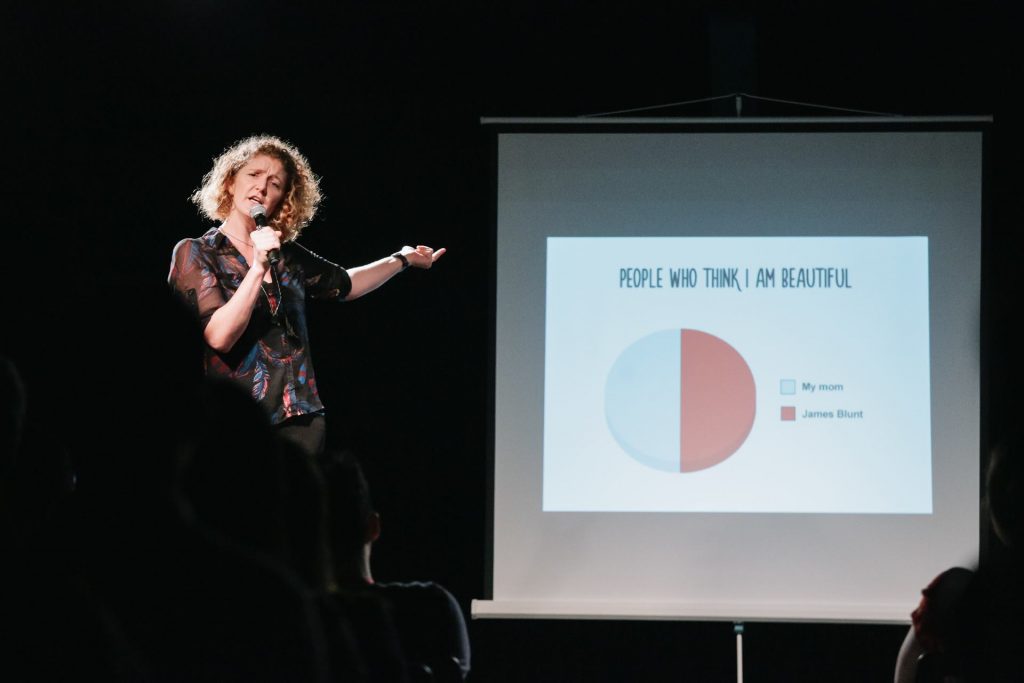
This is a famous one when it comes to virtual team-building games.
If you want to check your employees for how they react in high-pressure situations, test out PowerPoint Karaoke, also called PowerPoint roulette. The rules are simple: each player gets a set of slides they haven’t seen before. Based on those slides, a player should give a presentation to an audience. This team-building game also improves the skill of shrinking from rotten vegetables. *Joking*
There is a team version of PowerPoint Karaoke. Allow a few minutes before the presentation for a group of colleagues to review the slides and prepare. Under the circumstances, they will be forced to think quickly and collaborate closely to perform a difficult task. To make it easier to get started, you can grab free PowerPoint templates that are available, which will help you save time instead of preparing the presentation from scratch.
4. Slideshow for team building
Slideshow is a PowerPoint Karaoke alternative. This is also one of the virtual team-building games. In this game, one player presents a story that describes an adventure or process in detail, anything from traveling to building a birdhouse (or traveling in a birdhouse). Other teammates should act as the slide show for the presentation, repeating the story in motion. The Slideshow game boosts creativity and motivates participants to think on the go. It also demonstrates how teammates can support each other during difficult tasks.
5. Truth and lie

icebreakerideas.com
This activity fits into the “get to know each other” category. Each player comes up with three true facts and one lie about themselves. The lie should be believable (for instance, not something like “Chris Hemsworth followed me on Instagram”). After a teammate tells their facts, the players should discuss which one is a lie.
The Truth and Lie game gives both introverts and extroverts equal opportunities to reveal some information about themselves and get to know each other better.
6. GPS adventure

smartphones.gadgethacks.com
The GPS Adventure game relies on following clues to find a hidden item with the help of GPS coordinates. Each group of teammates needs to have a GPS device that will help in searches. A moderator sets a period of time in which all participating groups must return to “base.” The clues hidden in specific geographic locations can be part of a larger puzzle that the teams should solve. As an alternative to GPS coordinates, you can also use QR codes placed around the office or neighborhood.
This team-building activity motivates teammates to collaborate for the achievement of a shared goal using a specific process where “close enough” is not good enough. GPS Adventure and its QR code variation also boost problem-solving skills in a fun and engaging way.
7. What’s my name

appadvice.com
This has to be one of my favorite team-building games.
Write down the name of a famous person or people of that type (nerd, football fan, rock star, etc.) on sticker paper. Then, place these tags on a team member so that they cannot see who they are. For a set amount of time, this person should ask the group leading questions to figure out what is written on the tag. What’s My Name is a great ice-breaker game for those companies where team members don’t know each other well yet.
This is also a great one for virtual team-building games.
8. Blind wine waiter

lilesnet.com
Not without reason, numerous scientific studies show that nothing bonds people like sharing a bottle of red. The Blind Wine Waiter is a real treat for teams that face communication issues at the workplace and want to loosen up with each other.
In this game, a team of six should find, uncork, and pour a bottle of wine into a glass, with one person acting as the leader and the rest as waiters. The team gets one wine bottle, one glass and one corkscrew. Each waiter carries out no more than one element of the challenge and all of them are blindfolded. All elements are hidden in the room and should be discovered by the waiters. The challenge is that each team member can perform only one task with just one hand. For instance, if someone has found the bottle, they can’t go and find the glass too. The game is over when the leader drinks the served wine from the glass.
9. Let us guess

imdb.com
This game is a version of the classic game of charades and one of the best for virtual team-building games. All participants are divided into small teams of 5–7 people. One person should demonstrate a random object to their group that doesn’t know what this object is, without speaking. The group guesses the name of the object and gets a point for each right answer. The team with the highest score wins.
10. “Turn over” for a fun team-building
Here’s a simple but super fun challenge! Lay a big sheet or tarp on the floor, and have everyone stand on it together. The goal is to flip the whole sheet over without stepping off or dragging anyone along with you. Sounds easy, right? But trust me, once everyone starts moving, it becomes a bit of a brain teaser!
This game really gets the team thinking and talking to each other. You’ll need to come up with a plan and coordinate your moves carefully to make sure everyone’s on the same page. It’s all about working together and having a good laugh while doing it. And when you finally pull it off, it’ll feel like a small victory for the whole team!
11. Circle of questions

imgflip.com
All participants form two circles, one inside the other. As the circles rotate in opposite directions, teammates face each other, responding to different questions. The questions should be open and introduced by a moderator. The questions become more difficult with each round. The ultimate role of the Circle of Questions activity is to connect employers on a personal level and bring together colleagues from different departments. And keep in mind that there is no wrong answer (forget about an electric exam atmosphere).
12. Frostbite

imgflip.com
Do you like role-playing? No, you won’t have to repeat the Fifty Shades of Grey scenario at the workplace because this is one of the “team building games.” Just imagine that you are an Arctic explorer who got caught in a storm. The team’s leader is suffering from frostbite in both hands and is unable to help the team physically. At the same time, the rest of the team is suffering from snow blindness.
The challenge is to build the tent within the allotted time. Speaking of equipment, at this game you will need a tent and blindfolds for each team. The motionless leader should assist the rest of the team verbally. Make sure to give each participant the ability to play the leader’s role.
Tips for making team-building activities a hit
Team-building activities can do wonders for boosting engagement and helping your team collaborate better. But here’s the thing – it’s not just about picking a random game and hoping for the best. To really make these activities work, you need to choose the right ones, create a positive vibe, and make sure everyone feels comfortable joining in. Here are some tips to make your next team-building experience both fun and effective:
Make it relevant
Pick activities that actually matter to your team. Think about the skills your employees want to build, communication, creativity, problem-solving, and choose games or exercises that support that. When the activities feel meaningful, people get more out of them, and the lessons stick in day-to-day work.
Keep everyone included
A great team-building session gets everyone involved – from the quiet ones to the loud personalities. Ask your team what types of activities they’d enjoy, and make sure no one feels pressured to join something they’re not comfortable with. The goal is bonding, not forcing anyone into awkward situations.
Respect boundaries
Remember, team-building is part of work, not extra homework. Avoid scheduling activities outside working hours unless it’s completely optional. And never let fun cross the line into bullying or make anyone feel left out. Everyone should leave feeling energized, not stressed or awkward.
Don’t overload
It’s tempting to pack the schedule with lots of activities, but less is usually more. A few well-chosen exercises work better than cramming in too many. This keeps energy levels high and the experience enjoyable for everyone.
Make it fun
This is the most important part – your team should actually enjoy what they’re doing. Fun helps people communicate better, feel more connected, and remember the experience long after it’s over. Mix things up with both virtual and in-person activities to keep everyone on their toes and make the day memorable.
Wrap-up
To sum up, team-building games are a good way to get your team to connect, stay productive, and work better together. The best part is that the majority of these games can be played anywhere with little or no equipment, making them ideal for on-the-go virtual team-building games.
Now you’re ready to engage your team in fun team-building games without being hated. Below are some no-brainer team games that can boost teamwork, enhance problem-solving skills, and keep your teammates connected:
- Lava Flow
- Murder Mystery Dinner
- PowerPoint Karaoke
- Slideshow
- Truth and Lie
- GPS Adventure
- What’s My Name
- Outdoor activities (paintballing, sumo wrestling, etc.)
- Blind Wine Waiter
- Let Us Guess
- Turn Over
- Circle of Questions
- Frostbite
Try experimenting to find the activity that works best for you. Which one to choose depends on your goal, the number of participants, and your preparation time. Feel free to combine serious team-building games with fun activities for the best results.
What about you? What other team games have we missed from our list?

Onboarding Debt: Why a Weak Employee Onboarding Process Costs More Than a Bad Hire

Ghost jobs explained. Why companies post them, and how to avoid losing candidate trust

Leading Through Continuous Change: The Rise of Anticipatory Fatigue

The Ethics of AI in Recruitment: How Much of the Hiring Conversation Can a Machine Own?

Employee Referrals Aren’t Favoritism. They’re Organizational Intelligence.
Leading Through Continuous Change: The Rise of Anticipatory Fatigue
Onboarding Debt: Why a Weak Employee Onboarding Process Costs More Than a Bad Hire
Ghost jobs explained. Why companies post them, and how to avoid losing candidate trust
-

 Collaboration1 year ago
18 Experts Share Tips for Businesses Switching to Remote Work
-
 Communication1 year ago
6 Communication Plan Templates With Examples
-

 Collaboration1 year ago
30 Work From Home Memes: Funny Work Memes to Make You Laugh
-

 Collaboration1 year ago
6 Tips for Lifting the Burden of Too Many Responsibilities
-

 Productivity1 year ago
Super True Mental Health Memes You’ll Probably Relate To
-

 Collaboration1 year ago
7 Easy Strategies for Effective Team Communication
-
 Collaboration1 year ago
35+ Collaboration Quotes to Celebrate Teamwork
-

 Communication1 year ago
5 Innovative Ways to Use Chat Tools for Marketing