Productivity
7 Tips for Shorter Meetings (Without Productivity Loss)


The success of a business is not only achieved by long-term goals and plans, but also by ensuring that the day-to-day workflow is efficient and maximizes time. Of course in this day and age, employee satisfaction is integral in every decision making process. After all, has anyone ever complained about a meeting being too short?
According to themuse.com, 37 billion dollars are spent on unproductive meetings per year in the United States alone. A shocking 92 percent of executives confessed to multitasking during meetings. The numbers only increase when employees or meeting participants work remotely, where others can’t monitor their screen during meetings.
More than anything, keeping meetings short has to be part of the company culture. It shows respect for the employees’ time and their schedule. Whether your team members have hours of meetings a day or just a few a week, use these 4 tips to make each of those meetings shorter and more productive:
1. Have an agenda and stick to it
Don’t just have agenda. Have a good quality one with clear objectives. Know what you want to accomplish by the end of the meeting. Consult with any and all other teams/third parties if necessary to set clear and actionable goals. In fact, Forbes recommends spending twice as much time on the agenda as you may feel necessary in order to clarify objectives and really understand the points you’ll cover.
Make your meeting agendas open to the entire staff to contribute to, perhaps in the calendar invite for the meeting. By soliciting input from your attendees, you give them power to define the agenda. That ownership will also help teammates stick to the agenda when you eventually go off topic.
If you find it difficult to simplify a large amount of material, break your meeting up in to multiple sessions. Ask yourself if every meeting member is required for each item on your agenda. Assign time you will be spending on each agenda item, and stick to it strictly. It may feel forced and strict in the beginning, but will come naturally over time.
2. Empower your employees
The most efficient meetings center around making and confirming decisions. If you already have a strong agenda, meeting participants should already know exactly what to expect from the meeting and how to proceed with the next action steps. Not only does this allow for a healthy transparency between you and your employees, but it means that employees can come to the meeting absolutely prepared, saving even more time (or more meetings).
Try taking a page from the Flipped Learning handbook: give attendees access to the meeting notes, agenda, and any documents you’ll look at in the meeting, and ask everyone to come into the meeting with their questions ready. When everyone comes prepared to discuss the items, you spend less time introducing new concepts and more time getting to the real meat of problems.
As further empowerment, allow employees the opportunity to table a topic, especially if it’s clear the discussion will derail the agenda. Employees that have more flexibility feel more ownership over their work and meeting topics, will also take more responsibility outside of meetings. If employees have the ability to set a topic to the side for another time, they will feel empowered.
Sometimes, your employees may not have a lot to say about a given topic or they need to perform a little research before discussing further. Try giving them control and save yourself more time to focus on topics that are more worth your time in the current meeting.
3. Honor everyone’s time
Everyone must be on time, no exceptions. There’s no need to punish late-comers, as accidents happen, but respect the time of those who made it on time by proceeding or rescheduling the meeting.
Verbalize your disappointment when an employee comes to a meeting late. Start meetings on time, regardless of whether or not everyone is present. Tardiness does not have to be a punishable offense, but reinforce good behavior from employees who make it a point to come on time.
The best way to reinforce good behavior is, of course, by rewarding it. This can be done through various forms of praise, acknowledgement, and displays of appreciation, whether done privately or publicly. By repeatedly starting meetings on time, you will gain a reputation for punctuality, and employees will catch on, helping to build a positive meeting culture.
It is also important to end meetings on time. Schedule meetings to last for half the time that you think you’ll need. It will encourage participants to dispose with small talk and tangential conversation.
4. Utilize your tech
Off-topic conversations might start innocently, and most of us are guilty of initiating one every now and then. Try putting your detailed meeting agenda on a timed presentation to move conversation along at speed.
Everyone participating in the meeting should have access to the presentation so that all participants know the pace at which you are moving. Whether it’s on a screen in the meeting room, shared on a Hangout or video conference, or on each attendee’s laptop.
Technology is also helpful, if not integral, when meeting with remote employees. Make remote employees feel welcome by including every individual on the video meeting. Pay special attention to team collaboration tools. Watch for questions–remote employees may be less inclined to break into the conversation because they’re not in the same room.
Share any and all presentation or agenda material with remote attendees beforehand so that they may follow along with you. And make sure you end meetings on time so that remote workers can switch from one meeting to another; this also refers to one-on-one meetings.
Technology also offers the ability for a higher amount of interactivity and engagement from participants. Use your messaging software, your project management software, and any number of free online time tracking apps to build good meeting habits and stay on track during meetings.
5. Foster Open Communication
To have more productive meetings, create a setting where individuals feel comfortable to share. Ask your teammembers to speak up and provide their feedback without fear of judgment. By promoting openness, you gain trust, and this leads to better collaboration and more productive discussion.
Set clear ground rules, including “no interrupting,” so everyone has a turn to share. This puts everyone in the position of being heard, which creates an atmosphere where all ideas are honored, and that tends to generate creative solutions. And by encouraging diverse input, you can avoid groupthink and make better-informed decisions.
Starting meetings with an icebreaker or check-in question will set the tone for a more relaxed environment. When all voices are heard and respected, meetings are less intimidating and more welcome. Such openness engenders a sense of unity and generates results.
6. Mind Your Nonverbal Signals
Meetings are about more than just what’s said – they’re also about how it’s said. Pay attention to body language, both yours and your team’s. Subtle cues like crossed arms or lack of eye contact can indicate disengagement. By being attentive to these signs, you can change the tone or direction of the meeting to keep things on a positive track.
Use your own nonverbal behaviors to demonstrate participation. Smile, nod, and maintain eye contact to facilitate candor. Others will be very likely to copy your actions as you do so, producing a more cooperative environment.
Also, make the meeting area relaxed. Manage lighting, seating, and temperature to allow your team to focus on the talk, not distractions. Simple change of environment can make everyone feel more at ease and improve meeting outcomes.
7. Focus on Solutions Rather Than Problems
In order to keep meetings productive, shift the focus from problems to solutions. It’s simple to become bogged down in complaining about what didn’t work, but focus on actionable steps keeps the meeting moving. This encourages collaboration in resolving issues and makes your team more engaged.
Frame the dialogue with solution-focused questions like, “How do we improve next time?” This keeps the dialogue positive and on improvement, not failure. It also empowers your team to contribute ideas and suggestions, which leads to better outcomes.
If your team is struggling to come up with solutions, try brainstorming together. This gets individuals thinking outside the box and finding solutions. Focusing on solutions not only makes meetings more efficient but builds a culture of positivity and growth.
Conclusions
Most employees find meetings tedious. Managers complain they are ineffective, and often lead to even more meetings. Cutting down on meeting times, and meetings in general will increase employee satisfaction – not just for your employees and partners, but for you.


My close friend, a baby boomer in the concert business, once told me something with absolute conviction.
“I’ve hired plenty of millennials. They’re useless.”
“Hard to please.” “Impossible to understand.” “Lazy.” “Entitled.” “Job hoppers.”
Homer Simpson ‘born’ in 1987 is a popular cartoon millennial.
He said it so confidently that for a moment I wondered: is he right?
That conversation happened years ago. Now those so-called job-hopping millennials are senior managers, HR directors, founders, and C-suite executives. Many of them have teams of their own. They are not being managed anymore – they are building the systems.
All of this raises a few questions for HR in 2026. How do we actually manage millennials in the workplace, based on data rather than stereotypes? How do we build strong teams with them? Is there a way to understand this age group without rolling our eyes – and maybe even enjoy the process?
After digging into research and workplace studies, I want to share three practical insights for HR leaders and managers – based on large scale reports, behavioral research, and lived experience.
Who are Millennials?
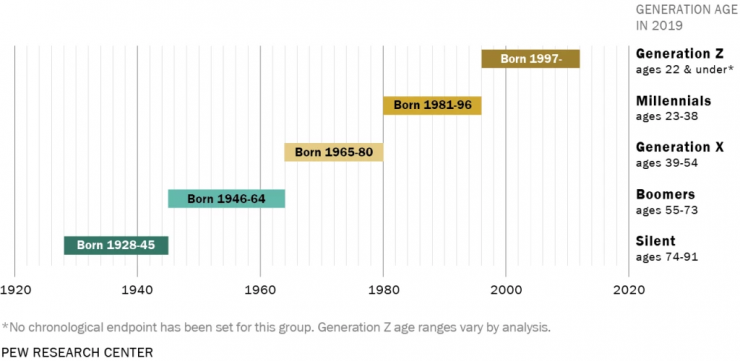
The best definition of millennials I’ve found so far is given by Pew Research Center.

Definition of millennials
In a nutshell, millennials are those who came into adolescence in the 2000s. The year 1996 is usually marked as a final birth year for them. Later, GenZers stepped into the game, while before the 1980s Baby Boomers were in the spotlight.
Let’s zoom out more for a bigger picture. (Just for the record, GenY and Millennials mean the same age cohort).
pewresearch.org
Among the most important facts about millennials, I’d outline the following:
- They are the largest generation in US history – until Gen Z
- They entered the workforce during or after the 2008 financial crisis, facing lower employment and starting incomes than prior generations
- Many delayed major milestones – homes, cars, marriage, children – due to financial pressure
But here is what changed. By 2026, millennials make up approximately 35% of the global workforce. Many hold senior roles. The “entitled job hopper” narrative is increasingly hard to defend when you look at the numbers: average millennial job tenure has grown steadily over the past decade as this generation has matured into mid-career stability.
The pandemic also permanently reshaped their expectations. Flexibility, work-life balance, and psychological safety are no longer nice-to-haves for this cohort – they are baseline requirements.
3 tips on how to approach millennials
1) ‘Lazy’, ‘sloppy’ and ‘unhappy’? Abandon stereotypes.
If you type “millennials” into your Google search bar, “screwed,” “worthless,” “selfish,” and many other not-so-flattering adjectives will probably follow your query. The question is: do these descriptions jibe with the facts?
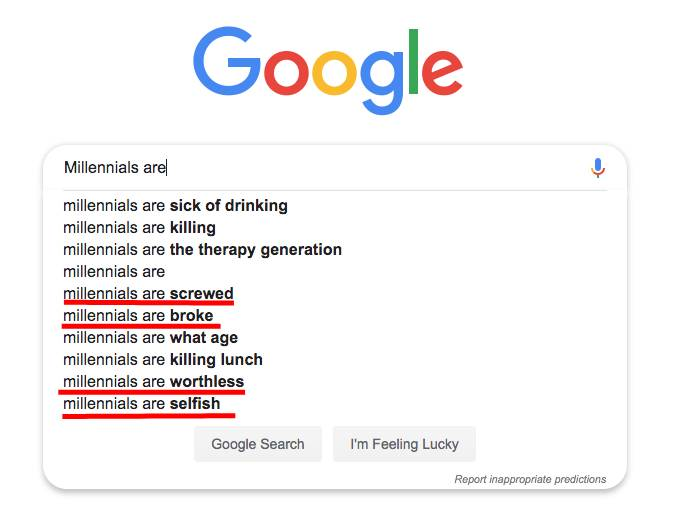
The EY Generational Study proves millennials are not some sloppy ego trippers. Actually, they are highly committed to their careers. Some researchers even call them “Generation Go” – companies need to keep pace with them or risk losing out on their talent.
A Harvard Business Review study found that 82% of millennial employees reported significantly higher job satisfaction when their work aligned with their personal values – compared to 61% of Gen X and 48% of Baby Boomers.
Tom & Jerry – another favorite cartoon of many millennials.
This suggests something important.
Millennials are not disengaged – they are selective. They want meaning alongside income.
If you are a CEO, HR director, or team lead trying to retain millennial talent:
- Communicate clearly about mission and impact
- Demonstrate real corporate social responsibility
- Show how individual roles contribute to a larger purpose
- Recognize achievements consistently
As researcher Ashira Prosac has noted, corporate social responsibility is a top priority for Millennials. The more a company gives back to the community, the higher employee satisfaction tends to be across this group.
In case a millennial is your peer, e.g., a colleague, be sure to look for a win-win solution in every situation – frame collective choices around shared benefit.
Most importantly, avoid stereotypes that act as self-fulfilling prophecies – when leaders expect disengagement, they often create it.
2) Provide no rigid framework. Embrace freedom.
In my circle of acquaintances, 6 in 10 people work hybrid or fully remote jobs. This reflects something fundamental – millennials value autonomy in how, where, and when they work.
So here’s a tip for anyone in a managing position. The Global Gen Z and Millenial Survey from Deloitte consistently shows that flexible work arrangements rank among top drivers of engagement and retention for this generation. This is not a pandemic-era blip. It’s a structural preference.
Flexibility can include:
- Hybrid or remote options as the default, not the exception
- Flexible hours instead of rigid nine-to-five schedules
- Outcom-based performance measurement rather than time-based monitoring
- Task variety and genuine autonomy in work execution
Experts from Stanford University even suggest you might help millennial workers pursue their side hustles! It can actually benefit everyone in terms of engagement and productivity.
There’s one caution, though: real freedom requires clear structure. Set measurable goals, establish KPIs, and maintain accountability. Millennials don’t want chaos – they want trust combined with clear expectations. That combination is what actually produces results
3) Connect – online and offline. Set up communities.
Do you remember your first instant message ever? Probably it was just ‘Hi’ or ‘All right?’. But I bet you never thought it would be a milestone for your communication.
First, there were PowWow, ICQ, or AOL Instant Messenger. Then Facebook, WhatsApp and HipChat came into the scene. The rise of social media and chat apps fell in the 2000s, which is exactly the time when millennials stepped into adulthood.
ICQ was the first chat program for many millennials.
In a word, millennials are the first digital natives, as emphasized in the Goldman Sachs research. In this light, being connected might be the third most important thing for them, apart from making a positive change and having enough freedom.
How do we connect with millennials? Apart from understanding and emphasizing with them, we might get to know them a little bit more. It doesn’t necessarily mean being their best friends. But maybe we could become a bit closer to each other instead of staying in separate cubicles forever.
A 2024 workplace study by Gallup found that millennials with strong workplace friendships are more than twice as likely to stay with their employer long term. Connection is not a culture perk – it is a retention mechanism.
So what does this look like in practice?
- Create opportunities for voluntary team bonding
- Invest in collaboration tools that foster interaction, not just task tracking
- Support employee resource groups and shared interest communities
- Encourage transparent communication across leadership levels
Chris Tuff in his book ‘Millennial whisper’ recommends connecting with millennial teammates on social media. If the idea of that makes you uncomfortable, Tuff argues, that discomfort is itself the signal: it means you need to invest more in those relationships.
Better connections lead to a greater sense of camaraderie, which is no less important for millennials. This doesn’t man to become the best friends with everyone, it means building trust and psychological safety. At this point, company culture is no longer a cosmetic layer; it’s a strategic infrastructure what prevent turnover.
When millennials are the managers
Here is the part that most “working with millennials” articles still miss in 2026.
Millennials are not just employees anymore. They are increasingly the people making hiring decisions, setting team culture, approving budgets, and shaping organizational strategy. HR professionals are, in many cases, now working for millennial leaders – not just alongside them.
Research from the Center for Creative Leadership identifies consistent patterns in how millennial managers lead:
- Collaborative decision-making: most prefer consensus-building over top-down directives
- High feedback frequency: regular check-ins with direct reports, often weekly
- Digital-first communication: instant messaging as the default channel
- Active boundary-modeling: a tendency to visibly protect work-life balance for their teams
These traits create realadvantages – and real friction. Millennial managers may clash with older employees who expect formal hierarchy, while simultaneously navigating Gen Z employees who want even more autonomy and purpose than millennials themselves did at that career stage.
Wrapping up and going beyond age concepts
The millennials your organization hired a decade ago have grown up. Maybe it’s time the conversation about them did too. Still, the core three principles for working with them remain the same.
- Let go of the stereotypes. Studies show millennials are highly committed to their careers and keen to have a positive impact on their community. Keep that in mind when communicating or negotiating with your co-workers in this age group.
- Be flexible. Freedom and ability to change in order to suit different life contexts are of the essence for millennials. Embrace flexible work approaches and diversity at the workplace.
- Connect with millennials and build some great communities. Being the first digital natives, they strive for the sense of camaraderie. You might consider getting in touch with them on social media more often.
At the same time, whatever age cohort we all are from, the differences between us might not be that important. Maybe next time you are interacting with a millennial, here’s what you can do.
Put aside anything you know about them. Take a deep breath and see a usual, regular human being in front of you. Don’t pay too much attention to their age at birth. They are just the same person as you. They want to benefit the world, strive for career advancement. They’d like to have a good salary and their achievements to be acknowledged. You might differ in some ways, but you are also similar in many ways. So you don’t have to bother much about the distinction between you two. Breathe, meet, connect… Chances are, you’ll enjoy your collaboration much more now.

Tired of feeling disorganized, overwhelmed, and confused when it comes to your daily tasks and responsibilities?
Then it’s time to streamline your workflow with a productivity planner.
Whether you work for a remote company, in an in-person role, or for yourself, you need a solid system in place to stay on track.
If you’re ready to beat overwhelm and get organized once and for all, stick around. In today’s article, we’ll cover why productivity planners matter, how to create an effective productivity planner, and seven tools you can use to manage your tasks.
Let’s take a look!
Why are productivity planners important?
Two words: Operational excellence.
No matter what role you’re in, your work functions as a cog in a bigger operational machine. The organization you work at (or run) has endless moving parts – processes, systems, departments, and workflows. Without these checks and balances in place, a business can’t function optimally.
But here’s the thing – operational excellence starts with individual organization. When you lose focus or miss a task, it doesn’t just affect your to-do list. It ripples through teams, projects, and even customer outcomes. Maintaining consistent levels of productivity across your day becomes almost impossible without a clear structure.
And yet, staying organized is a real challenge. Studies show that only 20% of people feel their work is truly under control each day. When tasks pile up without a clear structure, stress builds up and your productivity drops. You start reacting instead of planning, juggling everything at once, and feeling like you’re constantly behind.
That’s where productivity planners come in. They bring back a sense of order and calm by helping you prioritize tasks, track progress, and anticipate what’s next – instead of scrambling in the moment. A 2024 study even found that just 10–12 minutes of morning planning can recover nearly 2 hours of lost time and boost productivity by 25%.
In other words, productivity planners aren’t just a personal convenience – they’re a foundational part of achieving operational excellence. By turning chaos into structure, they empower both individuals and entire organizations to perform at their best.
1. Define your productivity goals
One of the most critical steps to creating an effective productivity planner is setting SMART goals. SMART stands for Specific, Measurable, Achievable, Relevant, and Time-bound. These criteria help you define your objectives and track your progress.
For example, if you want to improve your business intelligence skills, you could set the following SMART goal: “I will complete the online course on data analytics by the end of July 2026 and apply the learned concepts to my current project by the end of August 2026.”
As you can tell, this goal is specific (it explains what you want to do), measurable (it shares how you’ll know when you’ve done it), achievable (it’s within your reach), relevant (it’s important to your career), and time-bound (you’ve set deadlines to accomplish your objective).
So think about it:
- What needs your attention?
- What do you need to organize and focus on?
- What do you need to accomplish and by when?
- What will “done” look like?
2. Choose your planning system
Once you’re clear on your goals, choose the planning system you’ll be using to keep your timeline organized.
Let’s go over a few timeline options and why you might choose them:
12-month planning system: Best for annual goals
You’ve put together a blog post covering 11 small business ideas, and you’re ready to finalize which option you’d like to focus on.
As a budding entrepreneur, you know there’s nothing more important than the type of business you’re going to start, but you’re confused about which direction you should go in.
Instead of randomly choosing, you decide to dedicate a month to testing each idea on your list, for a total of 11 months’ worth of testing. You spend the 12th month finalizing your idea, meeting with a branding specialist, and legalizing your new business.
90-day planning system: Best for quarterly goals
You’re trying to hunt down a social media scheduling tool your marketing manager would be pleased with, but you’ve already presented four options in the last week that haven’t been up to par. Rather than rushing the process, you decide to meet with your marketing manager to get clear on their priorities.
At the meeting, your manager goes over the top features they expect the software to have and how much the firm is willing to pay for it. Your manager says the team’s willing to hold out for the best option, so you ask for a three-month deadline: A month for software research, a month to sign up for free trials and demos, and a month to present and test the final options as a team.
30-day planning system: Best for monthly goals
You’re planning a company retreat for your HR department to go over new protocols and take advantage of some much-needed downtime.
You don’t have many other tasks on your plate, and you’re only bringing a small group of 10 employees. While your team is mostly remote, everyone lives in the same city: Austin, Texas. You need to schedule accommodation for three days, meals, and transportation. You also need to put together a daily agenda.
To organize your productivity timeline, you decide to dedicate a week to finding the venue and hotel, a week to planning the menu, a week to organizing logistics, and a final week to creating the daily itinerary.
7-day planning system: Best for weekly goals
You have a 5000-word white paper due next week. You decide to spend one day researching your topic, one day planning the outline, one day writing the rough draft, two days writing the final draft, and two days editing your piece.
*Note: For the purposes of this article, we’ll be referencing a 12-month planning system.
3. Plan your task deadlines, meetings, and other pertinent dates
Now that you have your goals and timeline in check, it’s time to plan out the details.
So, look at your work orders and task assignments and plan out your deadlines, meetings, and other important dates.
Here’s a simple breakdown:
Yearly planning
Look at the year ahead and jot down all the important tasks, deadlines, events, and meetings.
Monthly planning
Break down the tasks on your annual schedule into smaller monthly goals. I.e., if you have a case study due on August 15, plan on starting the assignment on August 1. If you’re hosting a meeting on December 13, make sure you have everything planned by December 11.
Weekly planning
Break down your monthly tasks into smaller weekly goals.
For instance, if you’re starting the case study on August 1, that gives you two weeks to work on it. What can you accomplish in those two weeks?
For example, you could:
- Solidify case study goals by August 2
- Schedule interviews by August 4
- Interview stakeholders by August 9
- Create an outline by August 10
- Create a first draft by August 11
- Finish the final draft by August 14
Daily planning
Break up your weekly tasks into smaller daily goals.
For instance, if you need to finalize your case study goals by August 2, then plan on working on them August 1–2. If you need to schedule interviews by August 4, then dedicate a chunk of time on August 2nd, 3rd, and 4th to make calls and book your interviews.
4. Choose your productivity tools
And now for the fun part! Let’s choose the productivity tools you’ll be using to document your productivity process and stay organized.
But first …
Firm up your productivity planner must-haves
For instance, maybe you’d like a physical productivity planner that offers a calendar, sticky notes, and multicolored tabs.
Or maybe you’d like a bullet journal with professional felt-tip markers in an assortment of colors.
Or maybe you’re a digital-all-the-way kind of person and prefer an online productivity planner with Kanban views, Gantt chart tools, and automated task reminders.
Getting clear on your must-haves is key to staying organized as you hunt down your perfect productivity planner.
Here’s a checklist you can use to organize your non-negotiables:
- My productivity planner should offer the following time management features: _____________________________________________________________________
- My productivity planner should offer the following scheduling features: _____________________________________________________________________
- My productivity planner should be presented in the following format: _____________________________________________________________________
- My productivity planner should also include the following features: _____________________________________________________________________
And without further ado …
Printable productivity planner templates
For quick productivity support in a pinch, check out the following printable productivity planners:
1. Daily Pomodoro Planner by Onplanners.com:
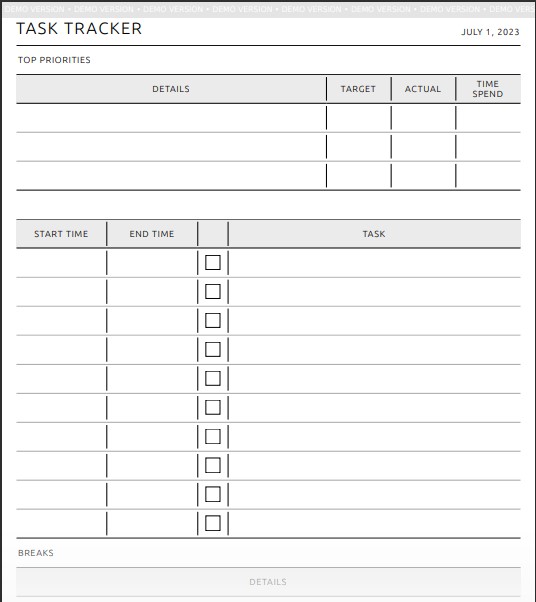
Available for instant download as a PDF file
Best for: Keeping up with daily tasks
If you struggle with productivity, give up before an objective is completed, or lack daily motivation, this productivity planner is for you! The Pomodoro technique is renowned for its effectiveness at enhancing productivity. This printable planner has everything you need to get clear on your goals, maximize productivity, and track your progress.
2. Daily Planner Template 04 by TemplateLab:
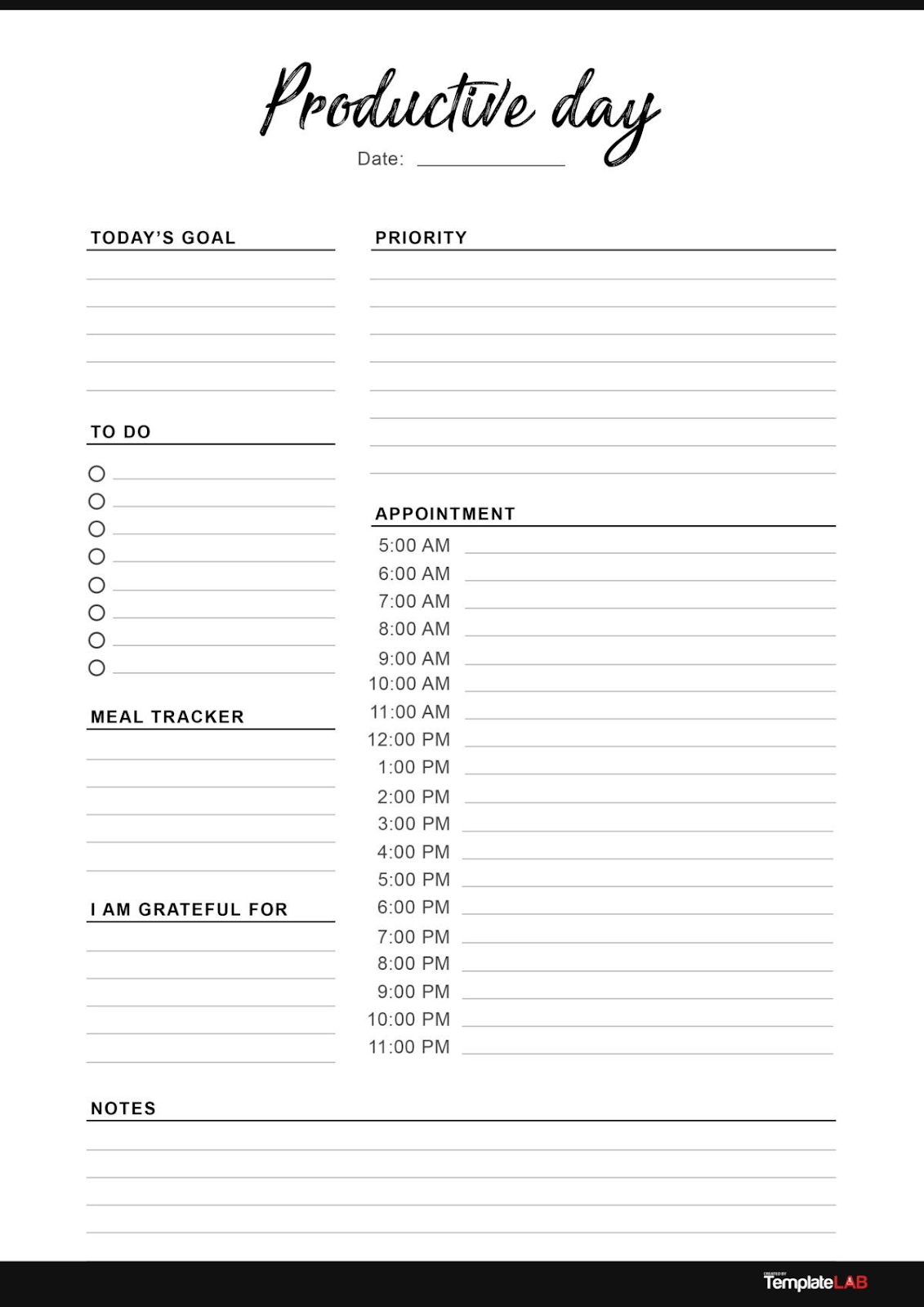
Available for instant download in PDF form, for Word, or for Photoshop.
Best for: Tracking appointments
If you need a simple productivity planner you can use to organize a day full of appointments, this template is for you. This bare-bones planner can also help you stay focused on one main goal, get clear on your priorities, and keep track of simple tasks. There’s also an option to track meals (for those really busy days) and a daily gratitude section.
3. Weekly Planner with To-Do List by DevelopGoodHabits.com:
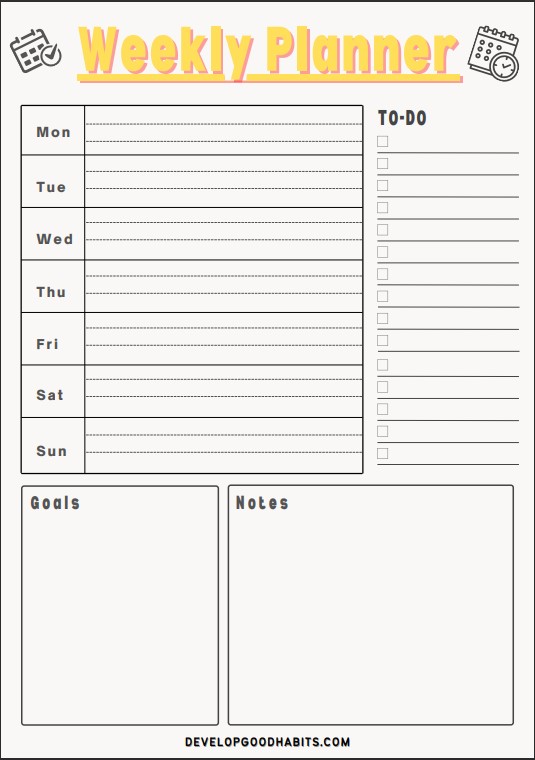
Available for instant download in PDF form.
Best for: Weekly goals and project management
If you need to organize weekly project management tasks into daily project chunks, or you prefer working in time blocks, give this option a try. This planner offers a weekly dashboard to organize all of your time blocks, as well as a to-do list, goals, and notes sections.
Physical productivity planners
If you prefer a physical productivity planner, you can open and close like a book, take a look at the following options:
4. Self Journal by BestSelf Co:
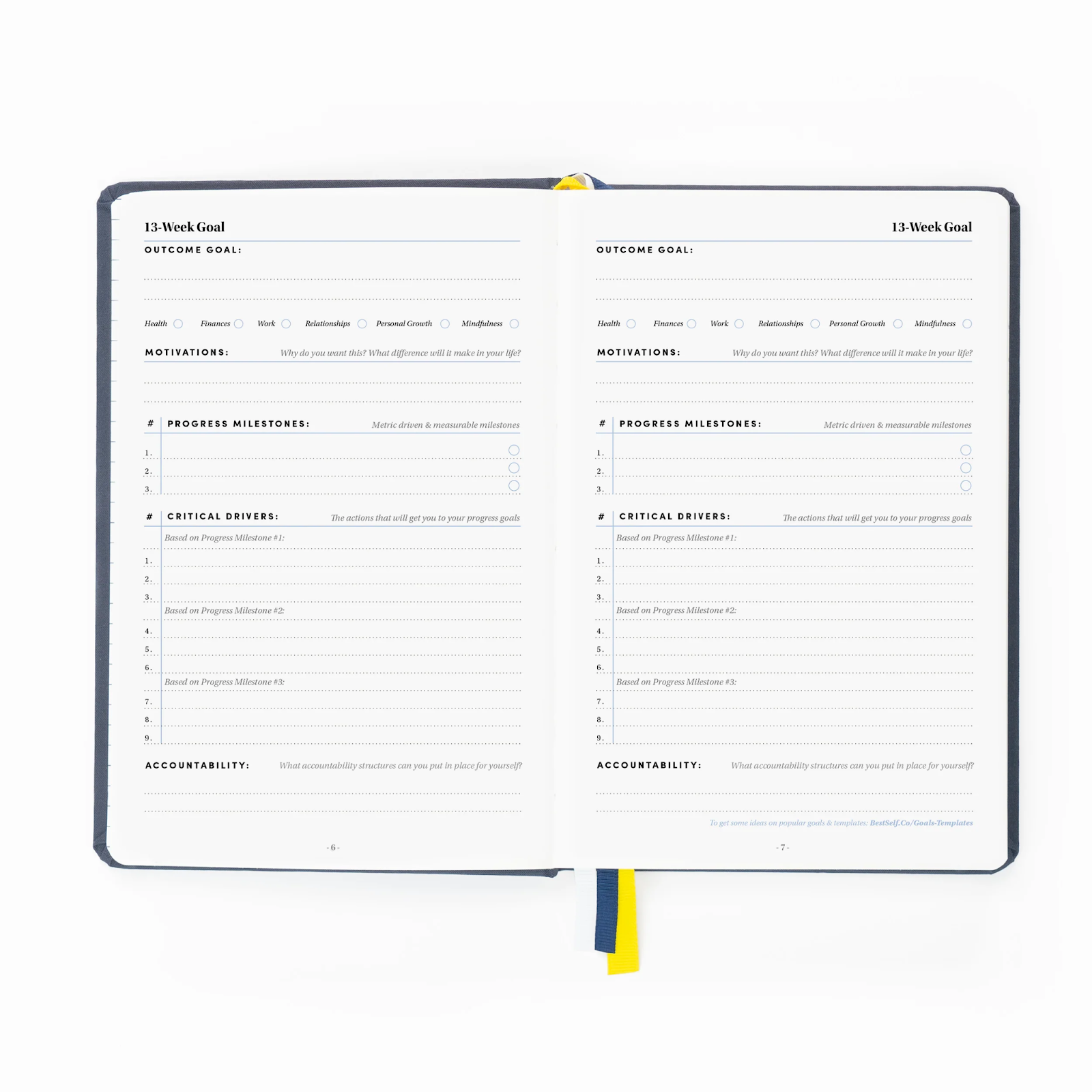
Available for purchase on Amazon and bestself.co.
Best for: Structure and consistency
If you’re looking to optimize your day, tackle your goals, and keep your priorities straight, the Self Journal is for you. This productivity planner can help you stay on track toward your most important goals and helps you beat decision fatigue so you can focus on what matters. One of our favorite features it offers is an undated monthly, weekly, and daily planning view. It also comes with extra bullet journal pages in case you’d like to take notes or design your own task logs.
5. Pro Version Dotted Journal by Scribbles That Matter:

Available for purchase on Amazon.
Best for: Custom productivity planning
If you need full control of your productivity planning, then this professional bullet journal is for you. With buttery-smooth paper and a state-of-the-art dot grid, you can design your spreads and organize your task logs – your way. This notebook also comes with a free 0.7mm black fineliner pen, a pocket for sticker sheets, and a divider guide. You can also save ample setup time as the journal comes with a pre-made key page, numbered dotted pages, and index pages.
Digital productivity planners
And finally, if you want to organize all of your todos in cloud-based systems, check out the following online productivity planners:
6. Eisenhower Matrix Template by monday.com:
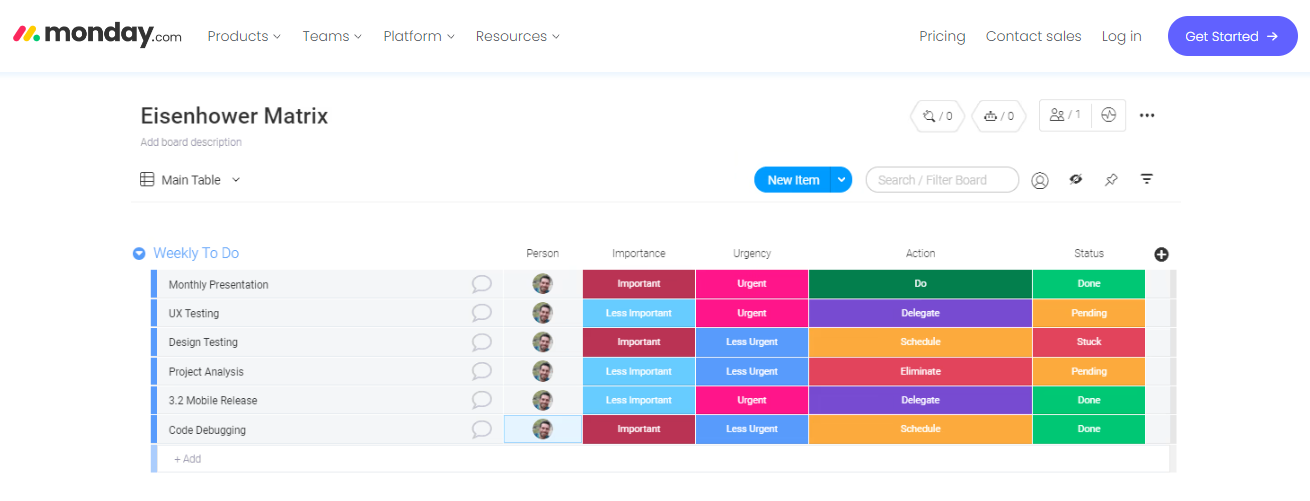
Available for use with a monday.com SaaS subscription.
Best for: Prioritizing weekly tasks and managing status updates
If you need a system to help you hyper-organize your weekly tasks and responsibilities, the Eisenhower matrix template offered on the monday.com Work OS platform can help you get your priorities in order. With the customizable template, you can record tasks and assign them a priority based on their urgency and importance. You can then decide to take care of the task yourself, delegate it to someone else, schedule it, or eliminate it.
7. Productivity Template by Trello:
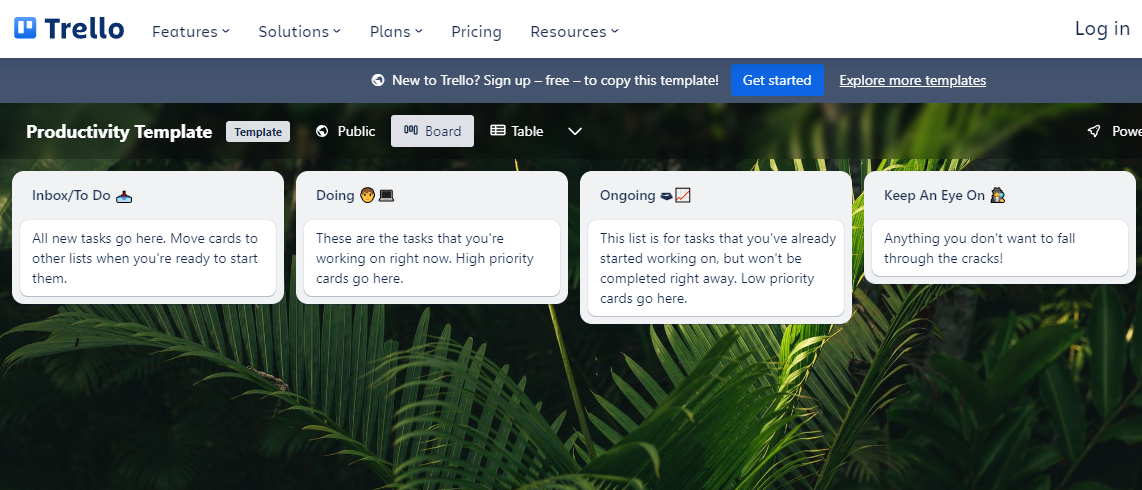
Available for use with a Trello SaaS subscription.
Best for: Kanban productivity planning
If you smile at the thought of drag-and-dropping your tasks from “to do” to “doing” to “done”, then you’ll love Trello’s Kanban-style Productivity Template. Simply add your upcoming todos to your “to-do” list, the tasks you’re currently working on to your “doing” list, and your recently completed tasks to your “done” list. You can also create additional lists, cards, and boards to plan, manage, and track anything you need.
Wrap up
And there you have it! Today we covered how to set up a productivity planner and what tools you can use to keep everything organized.
Now, over to you! It’s time to plan your productivity planner, choose your organizational tools, and start working smarter, not harder.

In the age of screens and emojis, it’s no wonder that coaching has taken a digital leap. Professional coaching in an online setting is the new talk of the town. And with good communication, you can take it to some great heights!
Gone are the days of face-to-face sessions and awkwardly trying to balance a latte while taking notes. Now, you can coach clients from the comfort of your pajamas, or, let’s be honest, from your favorite pair of fuzzy socks.
Picture this: renowned coaches like Tony Robbins, Robin Sharma, and Rich Litvin have ditched the traditional coaching game and hopped on the digital bandwagon. They’ve traded in their briefcases for laptops and their office walls for virtual backgrounds.
And why not? The professional coaching market is projected to skyrocket to a whopping $4.5 billion by 2028, according to Forbes. It’s like hitting the jackpot but without the flashing lights and cha-ching sounds.
If you are considering venturing into the online coaching world or want to enhance your coaching practice with good communication, this article is for you.
But before we dive into the nitty-gritty, let’s address the elephant in the digital room, shall we?
Unmasking the guru aka professional coach in a digital setting
Now, let’s meet the star of our show: the professional coach. Picture a regular coach, but with a digital twist. They’re like your personal cheerleader and accountability buddy, all rolled into one virtual package. But here’s the kicker – they don’t do the whole “in-person” thing.
Professional coaches have embraced the wonders of the digital era, harnessing the power of video conferencing platforms and online resources to guide their clients toward success. Say goodbye to the days of commuting and hello to the magic of a virtual meeting room. Who needs a stuffy office when you can create your coaching empire from the comfort of your own home?
These tech-savvy gurus work with clients to define their goals, develop actionable plans, and provide the tools and expertise needed to conquer the tasks at hand.
And with good communication as their secret weapon, a professional coach can take the industry by storm. Effective communication skills are the key to their success in unmasking the guru within them and delivering exceptional coaching experiences.
5 types of professional coaching you should know about
Now that we’ve cracked the code on professional coaching, let’s take a whimsical journey through the wonderland of coaching programs. Here are five types of coaching programs that will make your coaching business soar.
1. Executive coaching: where CEOs find their fairy godmother
Online executive coaching is among the most popular programs available for C-suite executives, business owners, and high-level managers. An executive coach helps top-level leaders establish team synergy, train them in problem-solving techniques, deal with change management, and implement new ideas.
2. Sales coaching: turning sales warriors into superstars
Online sales coaching is a skills-oriented coaching program in which a sales expert trains and mentors aspiring sales professionals. With online sales coaching, you’ll embark on a quest to master the art of closing deals and smashing targets. Through mock conversations, role-playing, and invaluable feedback, a sales expert will train and mentor you to engage with clients of all shapes and sizes.
3. Team coaching: unleashing the power of collaboration
Team coaching is a type of online group coaching in which team members learn about collaboration and establish team dynamics through different challenges. If your organization is in need of some harmony and cross-functional magic, team coaching is here to save the day. Together, you’ll break down barriers, build bridges, and create a symphony of success. It’s like a team-building retreat without the trust falls and awkward icebreakers.
4. Holistic health coaching: finding zen in a digital world
In a world full of deadlines, stress, and Zoom fatigue, taking care of your well-being is essential. Enter the realm of online holistic health coaching, where wellness warriors guide you on a journey of self-discovery. These virtual gurus help you focus on your physical, mental, emotional, and spiritual health. Whether you’re seeking work-life balance, better nutrition, or a moment of Zen amidst the chaos, these coaches have got your back. It’s like having your wellness genie ready to grant your wellness wishes.
5. Transformational coaching: from ordinary to extraordinary
Online transformational coaching is one of the most popular types of virtual coaching programs designed for individuals looking to transform their morning motivation, habits, lifestyle, appearance, and personality to find greater fulfillment in life and achieve different professional and personal goals.
The role of communication in setting up professional coaching
Starting a professional coaching business opens up a world of opportunities, allowing you to leverage technology, connect with clients globally, and embrace the flexibility and scalability that the digital landscape provides.
In this chapter, we’ll explore the 11 essential steps on how communication can help you when stepping into professional coaching.
1. Finding your coaching business idea
The first thing you need to do when starting a coaching business is come up with an idea.
Fortunately, you don’t have to do something that’s never been done before. Instead, you can search online for trends in the coaching industry.
Remember, people will pay for your skills and experiences.
So, ask yourself, “What are your strengths?”
For instance, if you’re a successful real estate investor or stock trader, you can coach others looking to venture into the industry using real estate software.
You can also create a short course based on your investing or trading expertise to provide a more complete learning solution.
Role of communication: Effective communication allows you to understand your strengths and identify the skills and experiences you can offer to potential clients. It helps you articulate your ideas clearly and concisely, making it easier for others to understand the value you bring as a coach.
2. Pick your niche
Today, you can find hundreds of coaching business ideas with a simple Google search.
However, you have to follow a formula that works for you. Remember, the purpose of coaching is to help others solve problems or adopt new skills and habits.
So, you need to pick a niche that you’re good at to be successful.
Some of the most popular niches in the market include:
- Life skills (public speaking, emotional intelligence, confidence, etc.)
- Family (household management, relationships, birth coaching, etc.)
- Personal development (career counseling, fitness, etc.)
- Leadership
- Finance
- Marketing and sales
- Digital transformation
- Pet handling
- Spirituality
- Health, etc.
Role of communication: When selecting a niche, good communication enables you to communicate your expertise and specialization effectively. For example, if you’re interested in developing your finances, a student loan debt coach could lend their expertise on topics like how to refinance private student loans or complex financial strategies to attract clients looking for guidance in this area.
It helps you convey to potential clients how your coaching services can address their specific problems or help them develop new skills and habits.
3. Determine your target audience
Once you have an idea and a niche to target, you need to understand who your clients are.
In the beginning, this might be difficult since your coaching services might not appeal to everyone.
However, you should have a good sense of your ideal clients.
The best way to do that is to understand the pain points in your area of expertise.
For example, if you’re a canine behaviorist specializing in handling different dog breeds, your target audience would be owners struggling to handle their dogs.
Role of communication: Understanding your target audience requires effective communication to gather insights into their pain points and challenges. By actively listening and engaging in meaningful conversations, you can tailor your coaching approach to resonate with their needs and aspirations.
4. Establish your coaching model
Next, you need to determine whether you want to coach clients individually or as a group.
One-on-one sessions will allow you to focus on one client at a time and offer more personalized advice and guidance.
In contrast, group coaching will allow you to coach multiple clients in a single session. More importantly, it will provide clients with the chance to work on their goals together without the need to be physically present at a designated venue.
In other words, you can help them create a sense of community and build accountability from anywhere.
You can prompt clients to stay motivated through continuous social support. Because people are generally more inclined to show up for sessions when they know other members are doing the same.
So, there are fewer chances of them making excuses, especially since they’re potentially just a few taps or clicks away from joining a session via a communication tools.
Role of communication: In choosing whether to coach individually or in groups, good communication ensures clear and transparent communication with clients about the benefits and outcomes of each approach. It allows you to set expectations, address any concerns, and foster a sense of community and accountability among group coaching participants.
5. Choose your professional coaching business name
Once you complete the steps above, it’s time to choose a name for your professional coaching business.
This will be the first step you take to create your brand. Most online coaches use their names and put “coaching” or “consulting” at the end.
Using your name also improves search engine rankings, meaning your site or information will likely appear on the first page of results.
Role of communication: Communication plays a significant role in creating a memorable and impactful business name. It helps convey your coaching brand’s essence and positioning to potential clients, making it easier for them to connect with your services.
6. Create your coaching program
Now that you have a name for your coaching business, you’re all set to create a signature professional coaching program for your clients, encompassing everything from structure to steps and resources.
For instance, if you’re a career coach looking to help clients switch careers, your program should include the following:
- An assessment of current job satisfaction levels and reasons for switching
- A review of your skills, expertise, and experience
- Upskilling and reskilling consulting sessions
- Job hunting and interviewing consulting sessions
- Transition management, etc.
Role of communication: Effective communication is essential in designing a comprehensive coaching program. It allows you to clearly define the structure, steps, and resources involved, ensuring clients understand the value they will receive and the outcomes they can expect from your coaching.
7. Pick your coaching platform
In recent years, there’s been a rapid influx of online coaching platforms on the market. These solutions contain various tools you can use to set up and run a digital coaching business.
Common tools include:
- Tools for scheduling sessions
- Video meetings
- Marketing funnels
- Built-in legal documents, such as client agreements and terms and conditions
- Google spreadsheets
- Website hosting (Bluehost, WP Engine, etc.)
Some coaching platforms also serve as marketplaces where you can promote your coaching business to thousands of potential clients.
Role of communication: Internal communication tools and platforms are the backbone of digital coaching. Choosing the right platform and utilizing its communication features effectively enhances your ability to connect with clients, schedule sessions, and provide ongoing support.
8. Procure your business tools
As you set sail on your professional coaching voyage, don’t forget to equip yourself with the essential tools of the trade. While there are dedicated coaching platforms available, you can also curate your own toolkit to meet your specific needs.
Communication is key, so consider leveraging some collaboration tools to keep your client interactions seamless and engaging. And let’s not forget about the financial side of things. Make sure to have reliable payment tools like PayPal or Stripe in your arsenal to streamline transactions and ensure smooth sailing in the realm of online payments.
Tip: Since you’re offering coaching services online, you need to protect your digital assets from cybersecurity threats. To do this, opt for an anti-malware solution to detect and eliminate threats like viruses, adware, worms, spyware, and more. You should also add additional layers of protection to enhance security further.
For instance, you can get VPN software to hide your IP and traffic and prevent data tracking. Many coaches often operate from public locations like cafés, libraries, airports, etc. by accessing public Wi-Fi networks. Using a reliable VPN provider, they can also prevent spoofing, hacking, and other threats.
But this doesn’t mean you shouldn’t protect your home network too. Now, you may be wondering, “Is private internet access safe?” Unfortunately, hackers may still penetrate your home network and get access to your sensitive information. It’s crucial to take measures like installing a reliable VPN software to prevent this from happening.
Role of communication: Good communication helps ensure smooth client interactions and seamless collaboration. Utilizing collaboration tools enables effective communication and engagement, while reliable payment tools facilitate seamless transactions, reinforcing trust and professionalism.
9. Work out your rates
Next, you need to figure out how much you value your expertise. The easiest way to do this is by researching the market rates, especially for your niche.
Initially, you want to make your rates lower than the market average to attract clients. However, your marketing should be spot on. For example, instead of offering a lower price, you can offer 50% off for the first month.
Or, you can offer a lower price for clients looking for annual subscriptions or packages.
Doing so will make your offer look more attractive. The last thing you want potential clients to think is that your rates are lower because you’re new to professional coaching.
Role of communication: Communication plays a vital role in pricing your coaching services. By researching the market rates and effectively communicating the value you provide, you can set appropriate rates that attract clients while maintaining your expertise’s perceived worth.
10. Create a marketing plan
Once you have your platform and coaching program ready, you need to devise a marketing plan to attract clients.
Remember, coaching businesses are transactional. Therefore, your content should be designed to foster long-term relationships and prompt potential clients to reach out to you.
You can use different mediums of communication to find the right clients, including:
- Social media (Facebook, LinkedIn, Instagram, YouTube, etc.)
- Coaching platforms
- Pay-per-click advertising
- Blogging
- Influencer marketing
- Podcasts, etc.
To speed up the process, we recommend tapping into your personal network — friends, family, colleagues, students, etc.
You can meet them in person initially, send emails, or send personal video messages.
Role of communication: A well-designed marketing plan relies on effective communication to reach and engage potential clients. Leveraging various communication mediums, such as social media, blogging, and personal outreach, enables you to effectively convey your coaching services’ benefits and foster long-term relationships.
11. Set up your coaching contract
Once you have ideal prospects, you need to set up a contract outlining the terms and conditions of your services. Coaching contracts typically include the following:
- Your program’s description
- Schedules
- Rules
- Payment terms
- Expectations and responsibilities
- Confidentiality, etc.
Role of communication: Clear and concise communication is essential in drafting a coaching contract that outlines the terms and conditions of your services. It ensures that both you and your clients have a mutual understanding of expectations, schedules, payment terms, and confidentiality, fostering a professional and transparent coaching relationship.
5 benefits of stepping into the world of professional coaching
1. Access to a wide array of clients
Online professional coaching, especially when done in group sessions, allows you to target a wide array of clients from different localities, cities, states, and even countries.
Although traditional in-person coaching offers more personalized learning, group coaching is a way to reach more people with less effort. Make sure to know who you want to reach and learn about your audience, whether it’s Generation X, Millennials, or Generation Z.
2. Online professional coaching saves time
By starting an online professional coaching business, you can avoid some of the time-consuming tasks associated with traditional in-person coaching. For example, you don’t have to physically meet a client at a specific location for sessions. Moreover, you won’t have to worry about office logistics, security, or other aspects of operations.
Remember that if you want to work from home, you have to have a good routine in place and learn how to avoid distractions and stay productive.
3. It makes scheduling easier and more flexible
Setting schedules can be incredibly challenging in a traditional hands-on coaching model due to time limits. You have to sift through emails, texts, and phone calls from different clients and work with strict timelines.
By adopting a remote-only model, you and your clients don’t have to worry about commuting to a specific location for sessions. Since sessions are online, you have a lot more flexibility when planning session timing.
4. You are your own boss
Perhaps the biggest benefit of starting a professional coaching business is being able to control lots of aspects of it. Since you’re your boss, you can manage every element, from planning to execution and analysis, much better compared to traditional coaching, including:
- Mission and vision
- Coaching style, routine, and rules
- Structure
- Operating budget
- Time management
- Channel selection
- Coaching niche (finance, fitness, personal development, etc.)
- Customer service
- Marketing
- Work style
Although offline coaching allows coaches to offer in-person sessions, it doesn’t provide the same level of flexibility in most of the elements above.
For instance, renting out a space and procuring equipment can take away a significant chunk of your operating budget.
Moreover, when marketing your offline coaching services, most of your target audiences will be from your locality since they would have to physically visit you for sessions.
Furthermore, by opting for traditional offline sessions, you would have to adhere to strict schedules with little or no room for adjustments.
5. Less investment at the start
Finally, by setting up an online professional coaching business, you can significantly minimize your initial investment and recurring expenditures.
For example, you won’t have to set up an office/coaching facility and invest in different audio-video equipment.
Secondly, you won’t have to worry about paying different utility bills or commuting to various locations to meet clients.
With these benefits, you can enjoy more profit and survive for longer periods without clients.
Summing up on professional coaching
The possibility of being coached from the convenience of your home has made professional coaching incredibly popular in the post-pandemic age.
This coaching model offers several lucrative benefits, including more flexibility in terms of schedules, anywhere-anytime access, on-demand support, and privacy.
As a result, many coaches are rapidly shifting away from traditional practices and setting up online professional coaching businesses.
If you’re looking to do the same, you can use this 11-step guide to simplify and accelerate your transition.

Onboarding Debt: Why a Weak Employee Onboarding Process Costs More Than a Bad Hire

Ghost jobs explained. Why companies post them, and how to avoid losing candidate trust

Leading Through Continuous Change: The Rise of Anticipatory Fatigue

The Ethics of AI in Recruitment: How Much of the Hiring Conversation Can a Machine Own?

Employee Referrals Aren’t Favoritism. They’re Organizational Intelligence.
-

 Collaboration1 year ago
18 Experts Share Tips for Businesses Switching to Remote Work
-
 Communication1 year ago
6 Communication Plan Templates With Examples
-

 Collaboration1 year ago
30 Work From Home Memes: Funny Work Memes to Make You Laugh
-

 Collaboration1 year ago
6 Tips for Lifting the Burden of Too Many Responsibilities
-

 Productivity1 year ago
Super True Mental Health Memes You’ll Probably Relate To
-

 Collaboration1 year ago
7 Easy Strategies for Effective Team Communication
-

 Collaboration1 year ago
35+ Collaboration Quotes to Celebrate Teamwork
-

 Communication1 year ago
5 Innovative Ways to Use Chat Tools for Marketing